Banana Pi BPI-R4
Es ist über ein Jahr her, seit ich meinen Testbericht für den Banana Pi BPI-R3 geschrieben habe. Endlich habe ich die nächste Iteration eines der leistungsstarken, portreichen, erweiterbaren und dennoch erschwinglichen SoC-Geräte von Sinovoip in die Hände bekommen. Schauen wir uns zunächst einige nackte technische Spezifikationen an.
Das Sinovoip Banana Pi BPI-R4 Gerät kommt in einer ESD-Tüte in einem kleinen Karton. Im Lieferumfang sind 3 SIM-Kartenhalter und 5 Schrauben enthalten. Darüber hinaus kein Zubehör, nur das nackte Board. Das Wort nackt mag etwas irreführend sein, denn das Board ist vollgepackt mit Funktionen und Erweiterbarkeit. Für mich ist das Highlight die dualen 10G SFP+-Ports. Im offiziellen Wiki wird nur von SFP-Ports gesprochen, was nicht nur irreführend, sondern schlichtweg falsch ist. Diese Ports sind nützlich, wenn Sie schnellere Raten als 1G von Ihrem Provider bekommen oder wenn Ihr UpLink nicht schneller als 1G ist und Sie 10G in Ihrem Netzwerk routen möchten.
Vergleichen wir die R4 mit den R3-Spezifikationen.
| Banana Pi R3 | Banana Pi R4 | |
|---|---|---|
| CPU-Kerne | 4 | 4 |
| CPU-Frequenz in GHz | <= 2 GHz | <= 1,8 GHz |
| RAM | 2 GB DDR 4 | 4 GB DDR 4 |
| interner Speicher | sowohl 8GB eMMC & 128 MB NAND | |
| 10000/5000/2500/1000 Mbit/s SFP+ | 0 | 2 |
| 2500/1000 Mbit/s SFP | 2 | 0 |
| 10/100/1000 RJ45 | 4 | 4 |
| SIM-Kartensteckplätze | 1 | 3 |
| mini PCIe | 1x Mini PCIe via USB für 4G LTE | 2x miniPCIe-Steckplätze mit PCIe3.0 2lane Schnittstelle für Wifi 7 NIC |
| M.2 | 1x KEY-M PCIe | 1x M.2 KEY-B Steckplatz mit USB3.2/PCIe3.0 Schnittstelle für 5G
1x M.2 KEY-M Steckplatz mit PCIe3.0 1lane Schnittstelle für NVME SSD |
| USB | 1 x USB 3.0 | 1 x USB 3.2 |
| Onboard Wifi | Wifi 6 4x4 2,4G Wifi(MT7975N) +4x4 5G Wifi(MT7975P) | kein Wifi onboard aber Wifi erweiterbar durch MT7988A Erweiterungskarte
Auf dem Papier ist der Prozessor beim R4 langsamer. Weiter unten finden Sie die Benchmark-Ergebnisse. Für alle Benchmarks betreibe ich das Board ohne Gehäuse, ohne Kühlkörper und ohne aktive Kühlung. Die Umgebungstemperatur liegt konstant zwischen 19,5 und 20°C.
Hardware
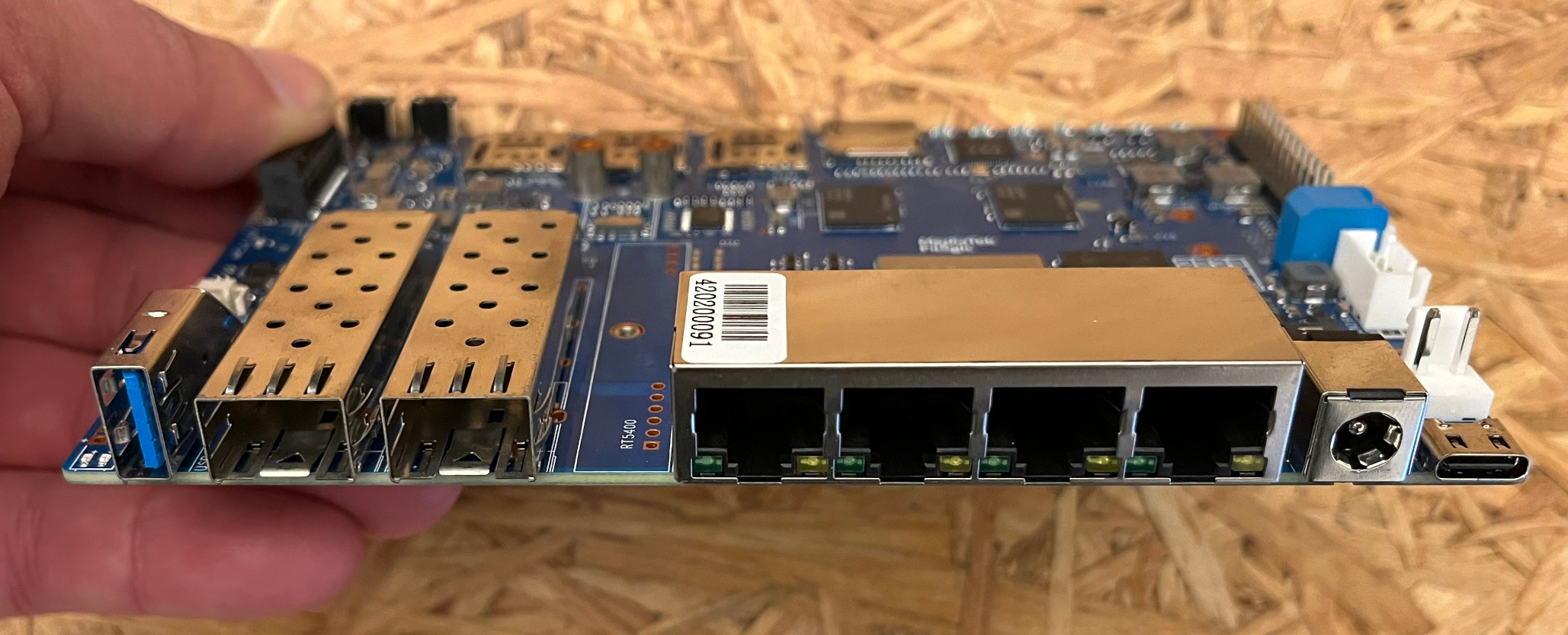
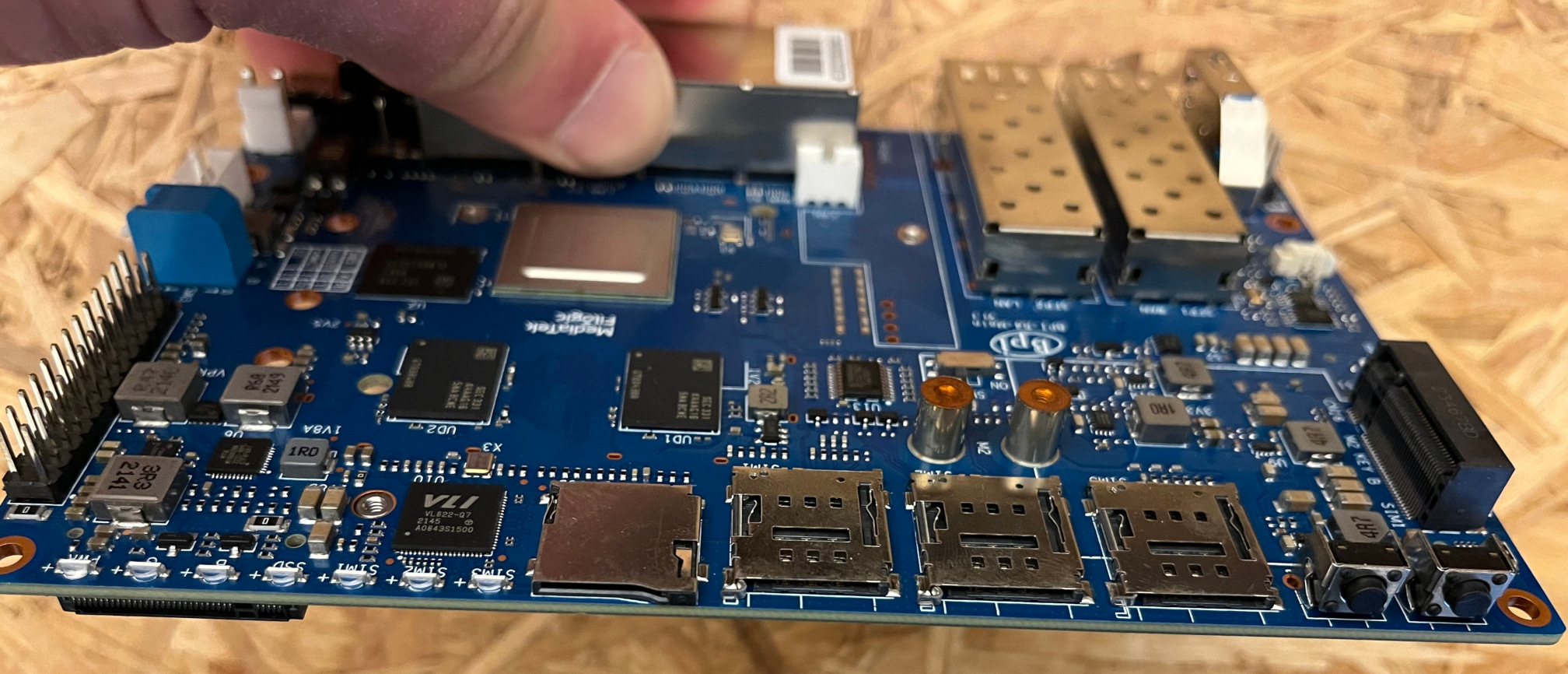
Das Board ist extrem erweiterbar. Selbst PCI-basierte Karten mit M.2-Anschluss scheinen in vielen Fällen zu funktionieren. Man kann 5G, USB-C, Wifi 7 oder mehrere SATA-Ports bekommen, wenn man möchte. Leider konnte ich keine dieser Optionen selbst testen, aber auf der offiziellen Getting Started-Seite wurden einige Optionen bereits erfolgreich getestet.
Man kann eine NVME-SSD in den unteren M.2-Steckplatz einsetzen, der schnellen Massenspeicher für den Banana Pi R4 bietet, aber man kann sie nicht als Boot-Medium verwenden. Weiter unten finden Sie einen Transferratengebnisvergleich mit 10G und einem NVME-Laufwerk.
Immer erwähnenswert: Es gibt einen 26-Pin GPIO-Header, falls man Sensoren anschließen oder wie beim Raspberry Pi herumbasteln möchte. Es gibt drei dedizierte Stromanschlüsse onboard: - XH-4PIN 5/12V, der zum Betrieb einer Festplatte genutzt werden könnte - PH-3PIN 5V mit PWM, der zum Betrieb eines Lüfters genutzt werden kann - und einen VH-2PIN 20V-Stromeingang
Die Bootstrap-Schalter wurden im Vergleich zum R3 verbessert. Nun ist auf der Hardware selbst dokumentiert, wie man sie korrekt einstellt, und die Namenskonventionen sind mittlerweile viel transparenter. Es gibt auch eine Reset-Taste und eine WPS-Taste.
Bilder des PI 4
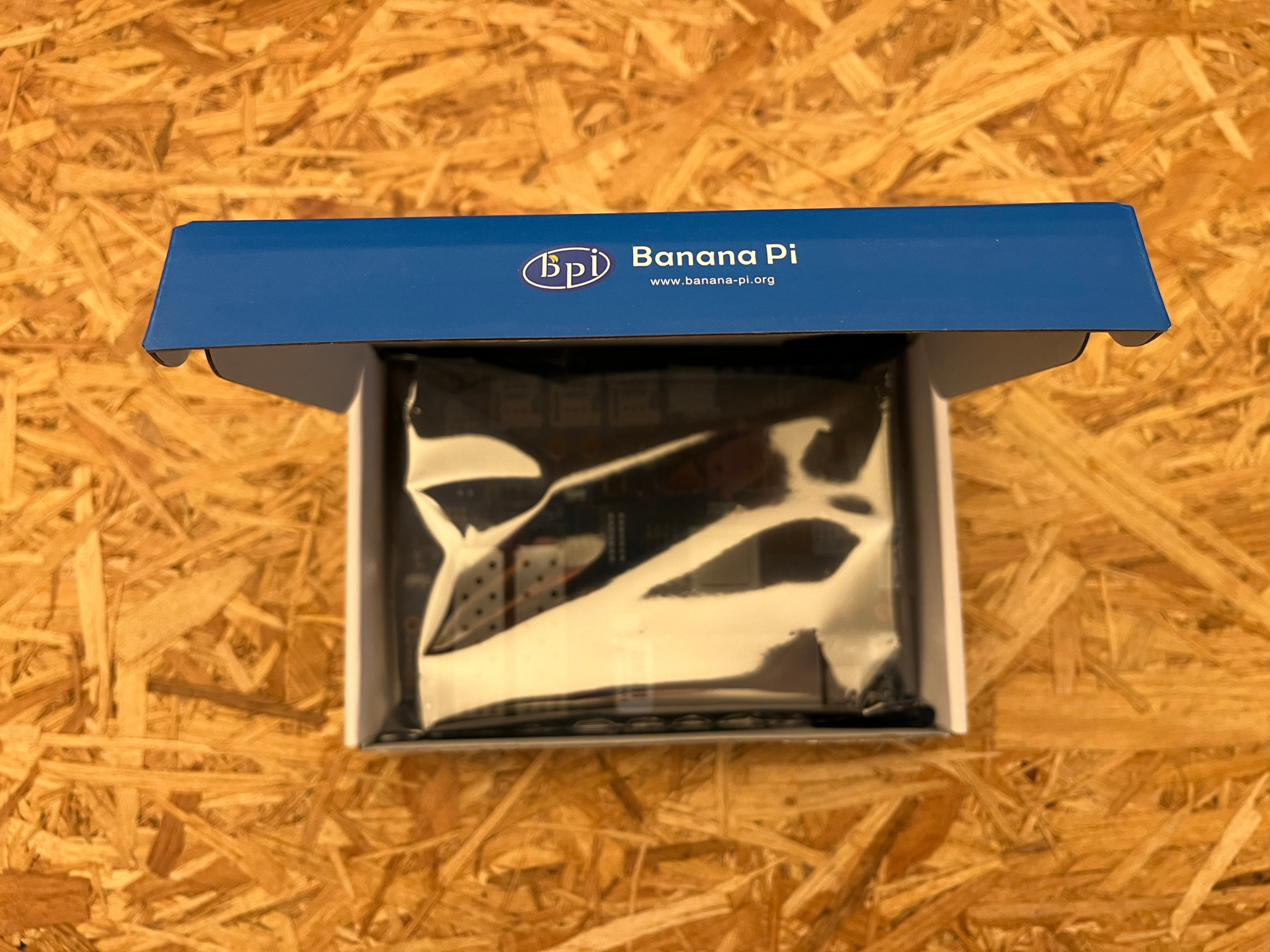
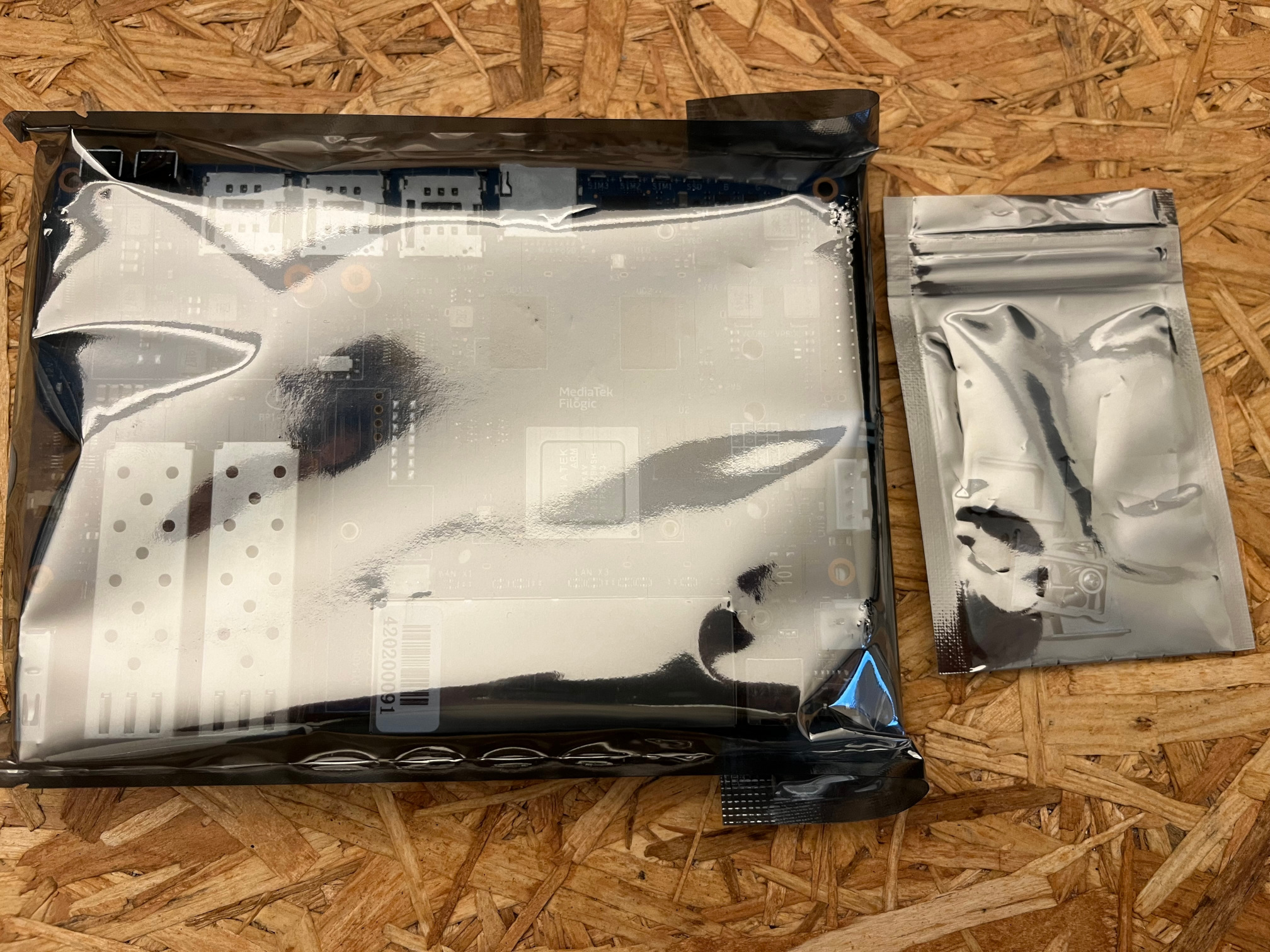
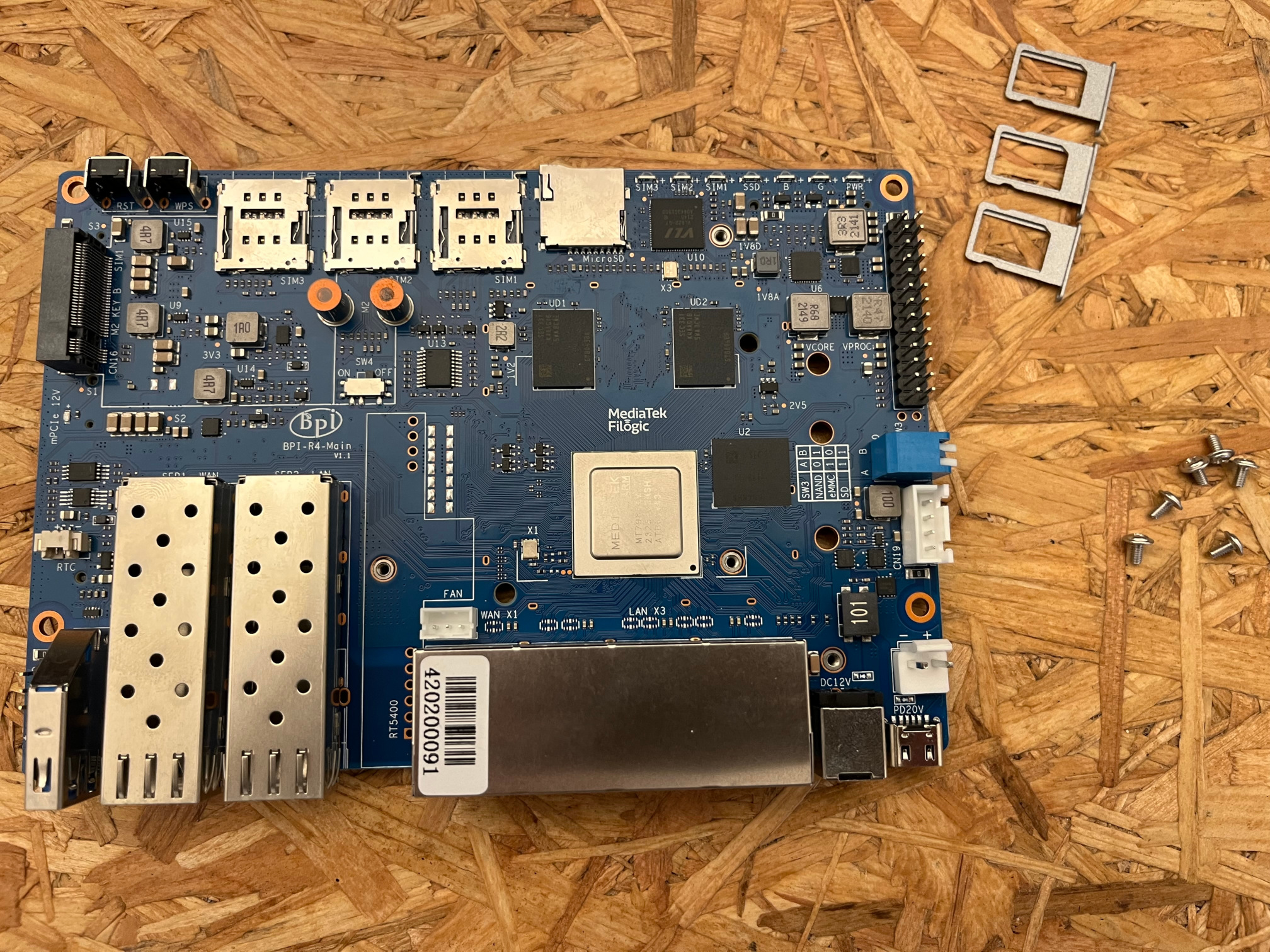
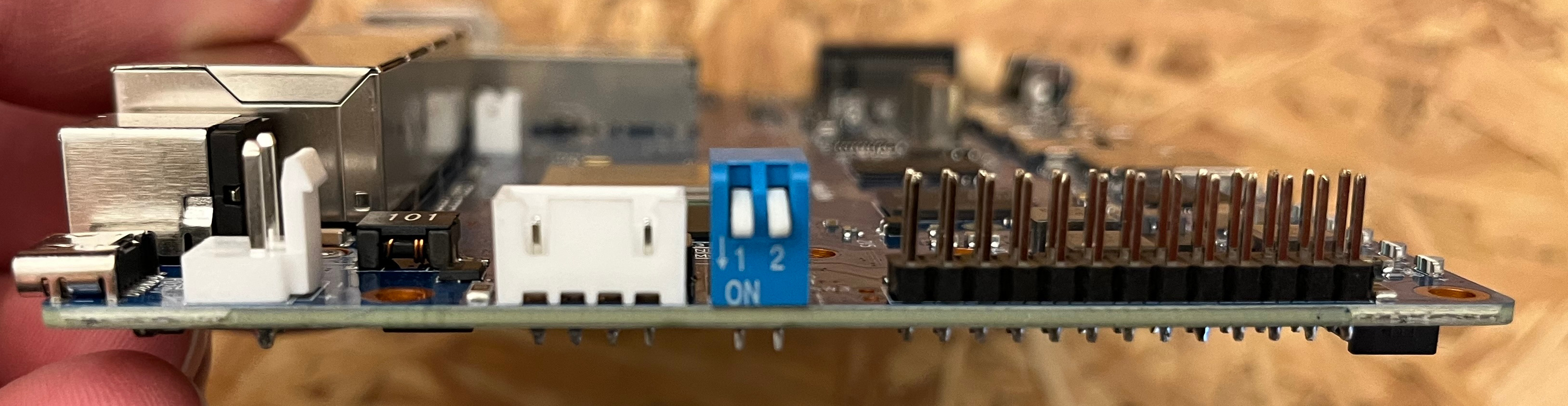
Verfügbarkeit
Der R4 ist ein recht neues Gerät (04/2024) und daher derzeit nur auf Ali Express erhältlich in verschiedenen Bundles. Das offizielle Gehäuse ist ebenfalls nur auf Ali Express erhältlich, kann aber leider nicht nach Deutschland geliefert werden. Ich hoffe, dass es bald in europäischen Shops verfügbar sein wird. Sobald dies der Fall ist, finden Sie hier entsprechende Links.
WLAN
Wifi 6 gibt es im OpenWrt-Universum noch nicht allzu lange und Sinovoip behauptet Wifi 7 Unterstützung für den R4 durch die Installation des WiFi7 iPA NIC Modules. Leider konnte ich dies nicht testen, da ich eine solche Karte nicht bekommen konnte.
Die Karte bietet 6 Pigtail-Anschlüsse für die Antennen. Das offizielle Metallgehäuse ist noch nicht verfügbar, wird aber ausreichend Öffnungen für WLAN- und 5G-Antennen bieten.
Software
Sinovoip veröffentlicht einen eigenen OpenWrt-Ableger. Sie haben jedoch keinen Namen dafür. Sie veröffentlichen ihn auf ihrer Wiki-Seite. Ich weiß allerdings nicht, warum sie das tun. Es würde wesentlich mehr Sinn ergeben, die Patches einfach ins OpenWrt-Projekt zu pushen. Es ist eigentlich etwas dubios, einen eigenen OpenWrt-Ableger zu entwickeln und ihn trotzdem OpenWrt zu nennen, was er NICHT ist.
Beim ersten Booten des Geräts kann man es auf NAND einstellen und es wird den Ableger booten. Es ist ein 21.02-Snapshot, recht alt. Ich weiß nicht, was bei mir passiert ist, aber nach einiger Zeit hörte das auf zu funktionieren. Ich bekomme einen failed to load image-Fehler, wenn ich versuche, von NAND zu booten.
NOTICE:  BL2: v2.9(release):
NOTICE:  BL2: Built : 18:12:03, Oct 13 2023
NOTICE:  WDT: Cold boot
NOTICE:  WDT: disabled
NOTICE:  CPU: MT7988
NOTICE:  EMI: Using DDR unknown settings
NOTICE:  EMI: Detected DRAM size: 4096 MB
NOTICE:  EMI: complex R/W mem test passed
NOTICE:  SPI_NAND parses attributes from parameter page.
NOTICE:  SPI_NAND Detected ID 0xef
NOTICE:  Page size 2048, Block size 131072, size 134217728
ERROR:   BL2: Failed to load image id 3 (-2)
Ich bootete auch von SD und versuchte, NAND zu löschen und neu zu flashen, aber auch das schlug fehl:
root@r4:/# mtd erase /dev/mtd0
Could not open mtd device: /dev/mtd0
Could not open mtd device: /dev/mtd0
Das ist tatsächlich ein Problem, da ich NAND bootfähig brauche, um auf eMMC zu flashen, da SD und eMMC in der Hardware geteilt sind, sodass ich nicht auf eMMC zugreifen kann, wenn SD gebootet ist.
Also gut, flashen wir ihren OpenWrt-Ableger auf die SD-Karte und booten diese. Zunächst scheint er zu booten, aber dann bleibt er in einer jffs2_scan_eraseblock-Fehlermeldung hängen. Er würde den Bootvorgang nicht abschließen.
[   19.581790] br-wan: port 2(eth2) entered blocking state
[   19.587037] br-wan: port 2(eth2) entered forwarding state
[   19.605342] sfp sfp@0: SM: enter present:up:wait event timeout
[   19.611233] sfp sfp@0: probing phy device through the [MDIO_I2C_NONE] protocol
[   19.618492] sfp sfp@0: SM: exit present:up:link_up
[   19.640433] mtk_soc_eth 15100000.ethernet eth2: resolve link status: system iface=0
[   19.649739] sfp sfp@0: SM: enter present:up:link_up event los_high
[   19.656396] sfp sfp@0: SM: exit present:up:wait_los
[   20.194993] IPv6: ADDRCONF(NETDEV_CHANGE): eth0: link becomes ready
[   20.204767] br-lan: port 4(eth1) entered disabled state
[   20.210380] br-wan: port 2(eth2) entered disabled state
[   35.875442] rt5190a-buck1: disabling
[   35.879463] vcore: disabling
[   35.882770] proc: disabling
[   35.886001] rt5190a-buck4: disabling
[   35.890008] rt5190a-ldo: disabling
[   39.736065] jffs2: jffs2_scan_eraseblock(): Magic bitmask 0x1985 not found at 0x09ec040c: 0x9798 instead
[   39.745545] jffs2: jffs2_scan_eraseblock(): Magic bitmask 0x1985 not found at 0x09ec0410: 0xfff4 instead
[   39.755021] jffs2: jffs2_scan_eraseblock(): Magic bitmask 0x1985 not found at 0x09ec0414: 0x0001 instead
[   39.764488] jffs2: jffs2_scan_eraseblock(): Magic bitmask 0x1985 not found at 0x09ec0420: 0x2000 instead
[   39.773954] jffs2: jffs2_scan_eraseblock(): Magic bitmask 0x1985 not found at 0x09ec0424: 0x2000 instead
[   39.783491] jffs2: jffs2_scan_eraseblock(): Magic bitmask 0x1985 not found at 0x09ec0428: 0x0800 instead
[   39.792960] jffs2: jffs2_scan_eraseblock(): Magic bitmask 0x1985 not found at 0x09ec042c: 0xd822 instead
[   39.802427] jffs2: jffs2_scan_eraseblock(): Magic bitmask 0x1985 not found at 0x09ec0430: 0xd855 instead
[   39.811893] jffs2: jffs2_scan_eraseblock(): Magic bitmask 0x1985 not found at 0x09ec0434: 0x007a instead
[   39.821358] jffs2: jffs2_scan_eraseblock(): Magic bitmask 0x1985 not found at 0x09ec0438: 0xef53 instead
[   39.830824] jffs2: Further such events for this erase block will not be printed
[   39.845170] jffs2: jffs2_scan_eraseblock(): Magic bitmask 0x1985 not found at 0x09ed0000: 0x2040 instead
[   39.854638] jffs2: jffs2_scan_eraseblock(): Magic bitmask 0x1985 not found at 0x09ed0004: 0x6040 instead
[   39.864105] jffs2: jffs2_scan_eraseblock(): Magic bitmask 0x1985 not found at 0x09ed0008: 0xa040 instead
[   39.873571] jffs2: jffs2_scan_eraseblock(): Magic bitmask 0x1985 not found at 0x09ed000c: 0xe040 instead
[   39.883047] jffs2: jffs2_scan_eraseblock(): Magic bitmask 0x1985 not found at 0x09ed0010: 0x2040 instead
[   39.892513] jffs2: jffs2_scan_eraseblock(): Magic bitmask 0x1985 not found at 0x09ed0014: 0x2040 instead
[   39.901978] jffs2: jffs2_scan_eraseblock(): Magic bitmask 0x1985 not found at 0x09ed0018: 0x6040 instead
[   39.912039] jffs2: jffs2_scan_eraseblock(): Magic bitmask 0x1985 not found at 0x09ed0400: 0x2041 instead
[   39.921508] jffs2: jffs2_scan_eraseblock(): Magic bitmask 0x1985 not found at 0x09ed0404: 0x6041 instead
[   39.930976] jffs2: jffs2_scan_eraseblock(): Magic bitmask 0x1985 not found at 0x09ed0408: 0xa041 instead
[   39.940440] jffs2: Further such events for this erase block will not be printed
[   39.954830] jffs2: jffs2_scan_eraseblock(): Magic bitmask 0x1985 not found at 0x09ee0000: 0x2080 instead
[   39.964297] jffs2: jffs2_scan_eraseblock(): Magic bitmask 0x1985 not found at 0x09ee0004: 0x6080 instead
[   39.973765] jffs2: jffs2_scan_eraseblock(): Magic bitmask 0x1985 not found at 0x09ee0008: 0xa080 instead
[   39.983230] jffs2: jffs2_scan_eraseblock(): Magic bitmask 0x1985 not found at 0x09ee000c: 0xe080 instead
[   39.992695] jffs2: jffs2_scan_eraseblock(): Magic bitmask 0x1985 not found at 0x09ee0010: 0x2080 instead
[   40.002161] jffs2: jffs2_scan_eraseblock(): Magic bitmask 0x1985 not found at 0x09ee0014: 0x2080 instead
[   40.011627] jffs2: jffs2_scan_eraseblock(): Magic bitmask 0x1985 not found at 0x09ee0018: 0x6080 instead
[   40.021697] jffs2: jffs2_scan_eraseblock(): Magic bitmask 0x1985 not found at 0x09ee0400: 0x2081 instead
[   40.031167] jffs2: jffs2_scan_eraseblock(): Magic bitmask 0x1985 not found at 0x09ee0404: 0x6081 instead
[   40.040633] jffs2: jffs2_scan_eraseblock(): Magic bitmask 0x1985 not found at 0x09ee0408: 0xa081 instead
[   40.050098] jffs2: Further such events for this erase block will not be printed
[   40.064646] jffs2: jffs2_scan_eraseblock(): Magic bitmask 0x1985 not found at 0x09ef0000: 0x20c0 instead
[   40.074113] jffs2: jffs2_scan_eraseblock(): Magic bitmask 0x1985 not found at 0x09ef0004: 0x60c0 instead
[   40.083580] jffs2: jffs2_scan_eraseblock(): Magic bitmask 0x1985 not found at 0x09ef0008: 0xa0c0 instead
[   40.093046] jffs2: jffs2_scan_eraseblock(): Magic bitmask 0x1985 not found at 0x09ef000c: 0xe0c0 instead
[   40.102512] jffs2: jffs2_scan_eraseblock(): Magic bitmask 0x1985 not found at 0x09ef0010: 0x20c0 instead
[   40.111978] jffs2: jffs2_scan_eraseblock(): Magic bitmask 0x1985 not found at 0x09ef0014: 0x20c0 instead
[   40.121443] jffs2: jffs2_scan_eraseblock(): Magic bitmask 0x1985 not found at 0x09ef0018: 0x60c0 instead
[   40.131537] jffs2: jffs2_scan_eraseblock(): Magic bitmask 0x1985 not found at 0x09ef0400: 0x20c1 instead
[   40.141004] jffs2: jffs2_scan_eraseblock(): Magic bitmask 0x1985 not found at 0x09ef0404: 0x60c1 instead
[   40.150470] jffs2: jffs2_scan_eraseblock(): Magic bitmask 0x1985 not found at 0x09ef0408: 0xa0c1 instead
Es stellt sich heraus, dass ich tatsächlich meine SD-Karte mit Nullen überschreiben musste, damit das offizielle Image wieder bootete. Ich führte cat /dev/null > /dev/sda aus und als es sich beschwerte, dass kein Speicherplatz mehr frei sei, brach ich den cat-Befehl ab und flashete das Image erneut auf die SD-Karte. Es benahm sich immer noch etwas seltsam, das heißt, nach dem Booten hing es kurz, bootete dann erneut und danach konnte ich die Konsole verwenden, um das NAND mit dem BPI-R4-BE1350-WIFI_MT76-20240202.zip Image und dieser Anleitung neu zu flashen.
OpenWrt
Glücklicherweise hat das OpenWrt-Projekt Unterstützung für den R4 in seinen Snapshot-Releases. Deshalb konnte ich ihn mit einem Nightly-Build von OpenWrt testen. Beim Schreiben dieses Berichts unterstützte die neueste Version von OpenWrt 23.05.3 den R4 noch nicht, deshalb habe ich mit dieser Snapshot-Version r25876-923d7c5531 getestet, die sich bereits als äußerst stabil erwies. Für die Tests habe ich eine 64 GB Samsung PRO Endurance SD-Karte verwendet.
Eine Sache, die meine Aufmerksamkeit erregte, war, dass die MAC-Adresse der Standard-br-wan-Schnittstelle nach jedem Neustart eine neue MAC-Adresse erhielt. Ich erwähnte dies im OpenWrt-Forum, aber bisher gab es keine Reaktion. Sinovoips Image litt ebenfalls unter diesem Problem. Außerdem konnte ich die Hauptpartition nicht vergrößern. Das Installieren zusätzlicher Pakete ist so wirklich problematisch, da der Platz knapp ist. Ich habe sogar den Imagebuilder und das Buildroot ausprobiert, um mein ganz eigenes Image mit größeren Partitionen zu bauen. Der gesamte zugewiesene Speicherplatz geht jedoch an /tmp (tmpfs), was keinen Nutzen bringt. Das Overlay-Dateisystem ist nur 80 MiB groß. Ansonsten funktionierte OpenWrt einwandfrei auf dem Gerät. Die einzigen Probleme, die ich hatte, betrafen die Stromversorgung.
Stromversorgung
Die offiziellen Anforderungen an das Netzteil sind entweder 12V / 5,2A oder 19V / 3,2A. Nach U=R*I bedeutet dies, dass das Netzteil bis zu 60 Watt liefern können müsste. Im Wiki sagt Sinovoip, dass der R4 nicht mehr als 10W ziehen wird, solange keine Peripheriegeräte angeschlossen sind. Vielleicht, wenn man das Gerät vollständig mit Peripheriegeräten bestückt, könnte es über 10W gehen. In meinen Tests tat es das nie.
Ich habe tonnenweise Netzteile in meinem Laboratorium, aber nur eines, das die 60W-Anforderung erfüllt. Leider war es etwas instabil und obwohl die Power-LED anging, bootete der R4 nicht von der SD-Karte. Ich probierte auch ein 12V-2A-Adapter aus und es funktionierte. Um den höheren Anforderungen gerecht zu werden, kaufte ich ein nagelneues Netzteil bei Amazon, das einwandfrei funktionierte. Siehe im nächsten Kapitel, wie viel Strom der R4 tatsächlich gezogen hat.
Stromverbrauch
Entgegen dem, was die Anforderungen an das Netzteil suggerierten, liegt der tatsächliche Stromverbrauch des Banana Pi R4 auf einem wirklich niedrigen Niveau. Vergleichen Sie bitte auch mit den Benchmarks für den R3. Bei voller Ausnutzung beider 10G-Ports, NVME und der CPU kann der Verbrauch auf etwa 10W steigen, was immer noch erstaunlich niedrig ist, z.B. im Vergleich zur DEC740 von Deciso.
| Bereich Stromverbrauch in Watt | Anzahl Twisted Pair verbunden | Anzahl SFP+ verbunden | CPU-Status | M2 SSD | mini-PCI express |
| --- | --- | --- | --- | --- | --- | --- | --- |
| 3.5 - 5.2 | 0 | 0 | Booten |  | |
| 4.2 - 4.4 | 1 | 0 | idle | | |
| 4.7 - 4.9 | 1 | 0 | 1 Kern 100% | | |
| 5.3 - 6.0 | 1 | 0 | 4 Kerne 100% | | |
| 6.5 - 8.0 | 1 | 0 | idle |
| |
| 4.2 - 4.4 | 1 | 0 | idle | | |
| 4.7 - 4.9 | 1 | 0 | 1 Kern 100% | | |
| 5.3 - 6.0 | 1 | 0 | 4 Kerne 100% | | |
| 6.5 - 8.0 | 1 | 0 | idle |  | |
| 5.9 | 1 | 2 | idle | | |
| |
| 5.9 | 1 | 2 | idle | | |
Der Stromverbrauch ist beim R4 wirklich gut, viel besser als ich erwartet hatte. Ohne Nutzung der Erweiterungsports liegt er bei nur 4-5W. Eine zusätzliche SSD fügt etwa 2W hinzu. Insgesamt ist dies für mich derzeit eines der besten Dual-SFP+-Geräte auf dem Markt in Bezug auf den Stromverbrauch.
CPU-Benchmark
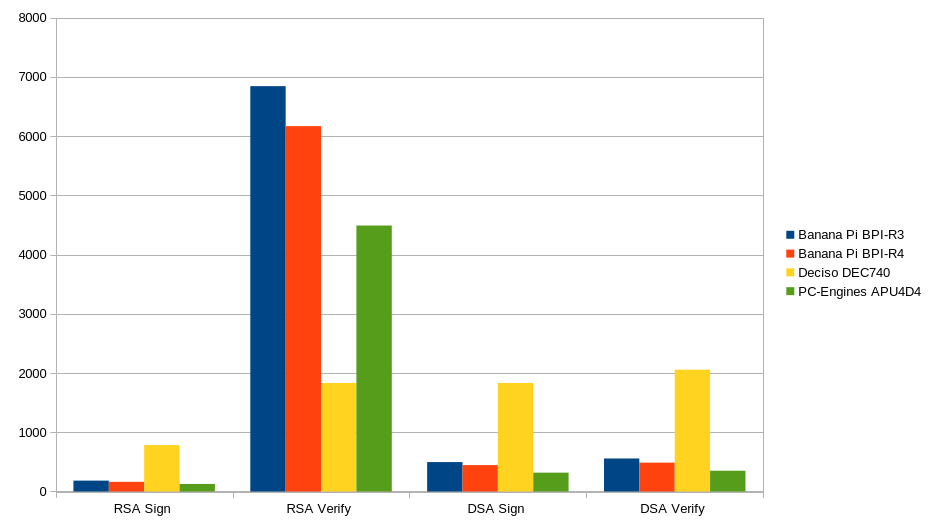
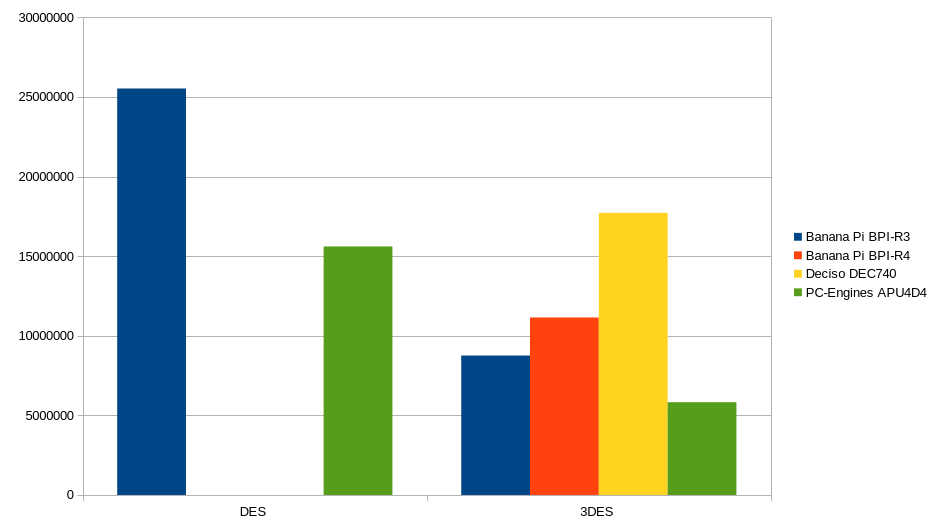
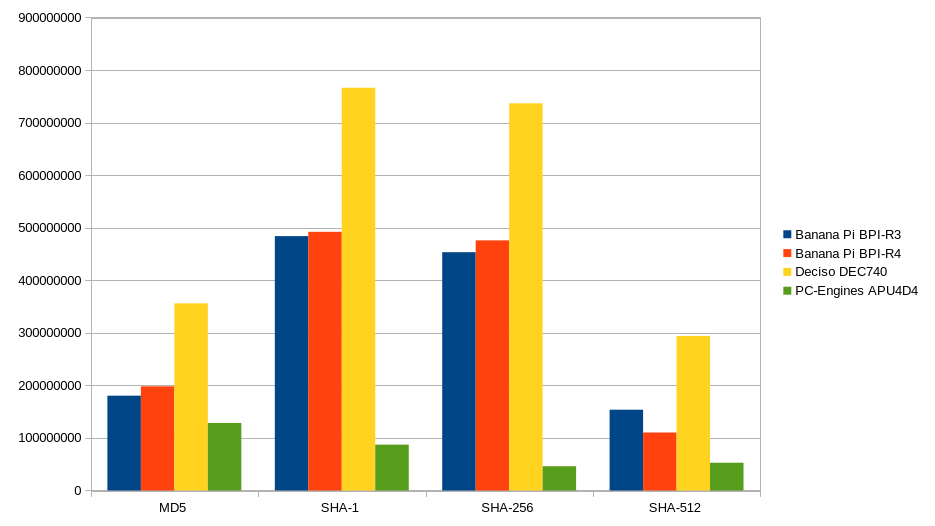
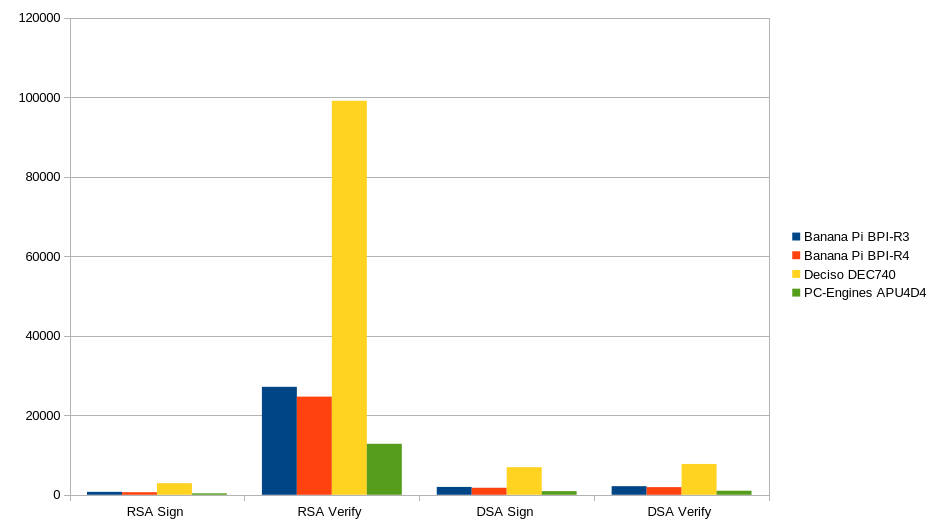
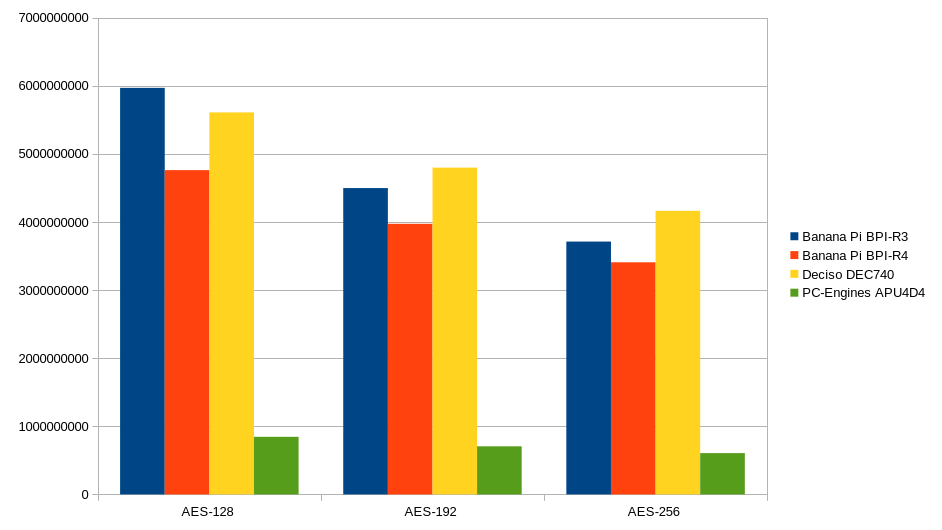
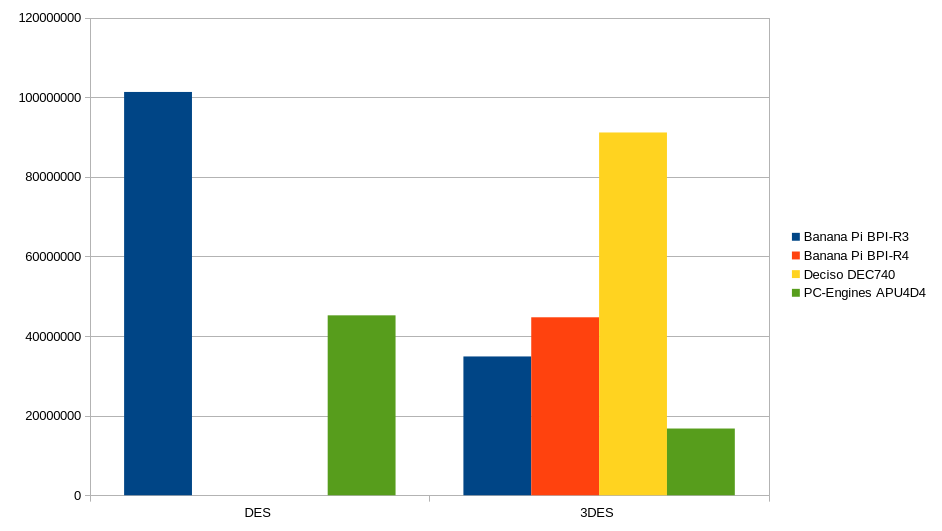
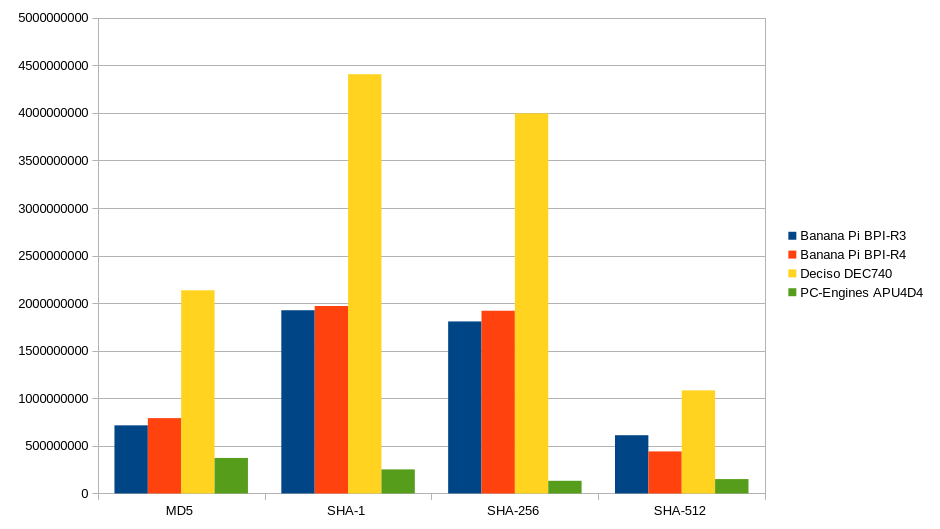
Für die CPU-Benchmarks habe ich die Kommandozeilenbefehle von der OpenWrt-Benchmark-Wiki-Seite verwendet. Die Taktfrequenz der CPU des R4 ist 200 MHz niedriger als die des R3. Das mag der Grund sein, warum in fast allen Benchmarks der R4 vom R3 geschlagen wird, allerdings nicht mit großem Abstand. Die einzige Ausnahme ist das Hashing, wo der R4 um eine winzige Spanne besser abschneidet, solange es nicht SHA512 ist. Diese Ergebnisse kamen für mich überraschend. Obwohl die Taktfrequenz niedriger ist, hätte ich erwartet, dass die Effizienz höher ist, aber das kann ich nicht feststellen. Ich habe die Tests mehrmals wiederholt, um sicherzustellen, dass keine Fehler darin enthalten sind. Ich habe sogar neue Benchmarks auf den anderen Geräten durchgeführt, da ich früher mit OpenSSL-Version 1.x getestet hatte, während die aktuelle Version 3.x einen großen Boost bei der AES-Verschlüsselung generell bringt.
Für die Benchmarks habe ich OpenSSL 3.0.13 mit der Snapshot-Version von OpenWrt verwendet. Ich habe keinen Temperatursensor, um die CPU von außen zu messen, aber laut den internen Sensoren lag sie zwischen 56 und 59 °C, gemessen mit lm-sensors.
In den folgenden Benchmarks habe ich mehrere Geräte genommen, alle mit OpenSSL 3.0.13, um zu vergleichen, wie sie performen. Dies sind die Geräte, die ich für meine Benchmark-Diagramme verwendet habe: - Banana Pi BPI-R3 (ARM) - Banana Pi BPI-R4 (ARM) - DECISO DEC740 (x86_64) - PC Engines APU4D4 (x86_64)
Single-Threaded Benchmark-Ergebnisse
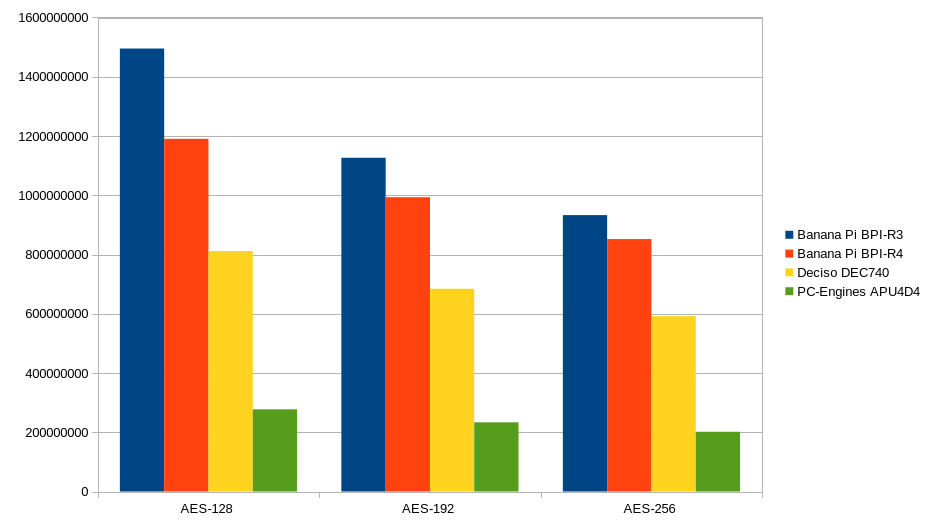
Multi-Threaded Benchmark-Ergebnisse
Es gibt einige externe Benchmarks, die tiefer in das eindringen, was das System leisten kann.
- Wireguard Benchmark-Vergleich
- iperf3 Benchmark-Ergebnissehttps://forum.openwrt.org/t/please-run-iperf3-c-127-0-0-1-and-post-results-here-to-make-router-database/109897/335)
Netzwerk-Benchmark
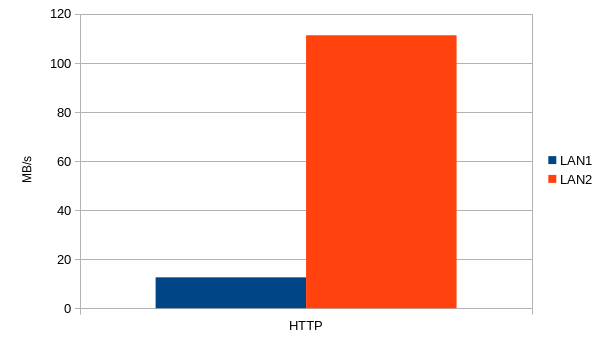
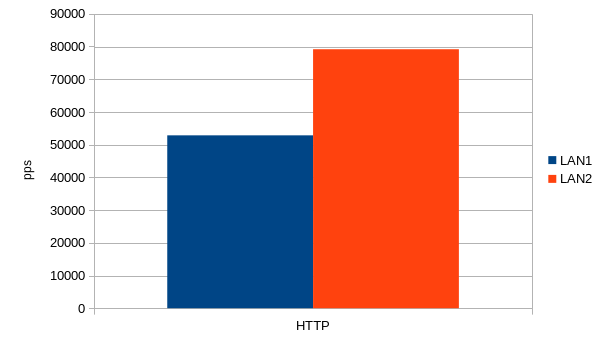
Die Netzwerk-Benchmarks wurden mit Cisco's T-Rex Version 3.04 auf einem Debian 12-System zusammen mit einer Nvidia ConnectX-5 Dual-Port-Karte durchgeführt. Die SFP+-Module, die ich verwendet habe, waren:
- fs.com SFP-10GSR-85 (SR) -> funktioniert
- solid-optics.com NOKR-SFP-10G-LR-SO -> funktioniert
Während des Benchmarkings stiegen die Temperatursensoren stets auf etwa 57-58 °C, während im Leerlauf meist um 53 °C.
Dies ist eine grafische Darstellung des Testaufbaus
HTTP
T-Rex bietet einen Benchmark mit HTTP-Traffic, was sehr häufiger Traffic für eine Firewall ist. Dies ist die T-Rex-Kommandozeile, die ich verwendet habe:
IMIX
IMIX ist eine wilde Mischung aus verschiedenen Protokollen, die ich mit T-Rex getestet habe. Hier ist die Kommandozeile, die ich für die Tests verwendet habe:
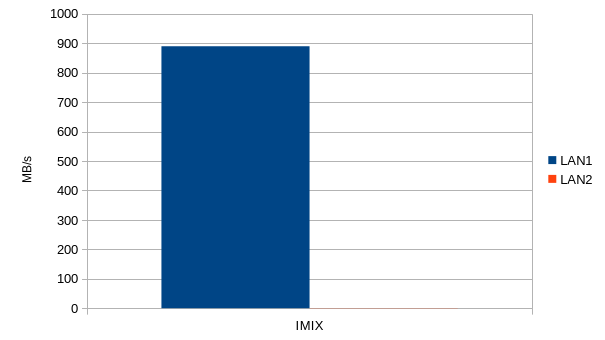
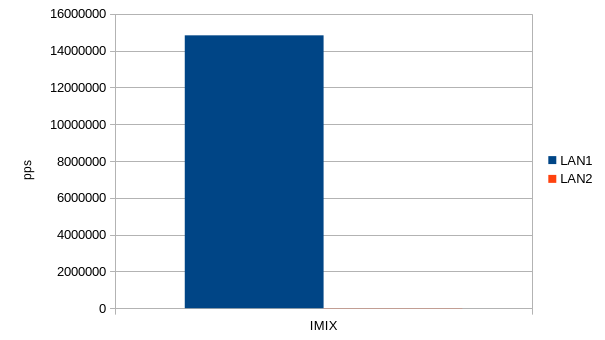
Ich kann keinen Grund nennen, warum die Schnittstellen im Benchmark so unterschiedlich performen. Ich habe so etwas zuvor schon im Zimaboard-Review mit OpenWrt gesehen. Die Transferrate erreichte Spitzenwerte von etwa 7,6 Gbit/s, aber im Durchschnitt lag die Transferrate bei etwa 7,1 Gbit/s = 889 MB/s. Ich hätte ehrlich gesagt etwas schnellere Raten erwartet, aber auch hier konnte ich den Test nicht mit Jumbo Frames durchführen.
DNS
DNS sind sehr kleine Pakete. Dies ist die Kommandozeile, mit der ich getestet habe.
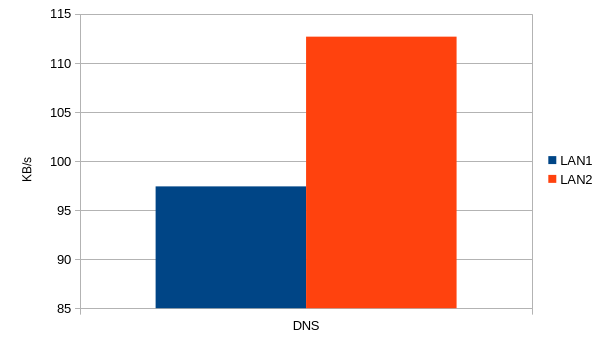
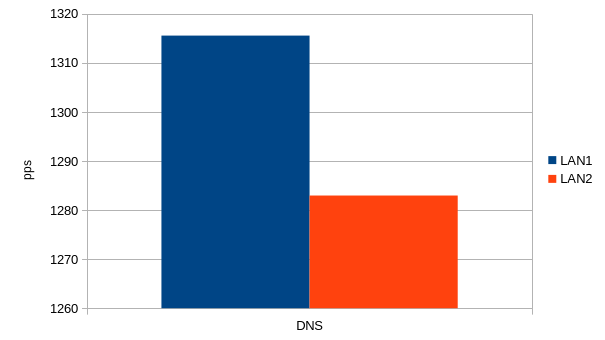
Samba NVME
Da es einen Onboard-NVME-Steckplatz gibt, wollte ich sehen, welche Transferraten der R4 erreichen kann. Ich baute eine Samsung 970 EVO 500 GB in den Banana Pi ein, formatierte sie mit EXT4 und konfigurierte den Samba4-Dienst wie folgt:
config samba
        option workgroup 'WORKGROUP'
        option charset 'UTF-8'
        option description 'Samba on OpenWRT'
        option interface 'wan'
        option enable_extra_tuning '1'
        option disable_async_io '1'

config sambashare
        option name 'test'
        option path '/mnt/tmp/test'
        option read_only 'no'
        option guest_ok 'yes'
        option create_mask '0666'
        option dir_mask '0777'
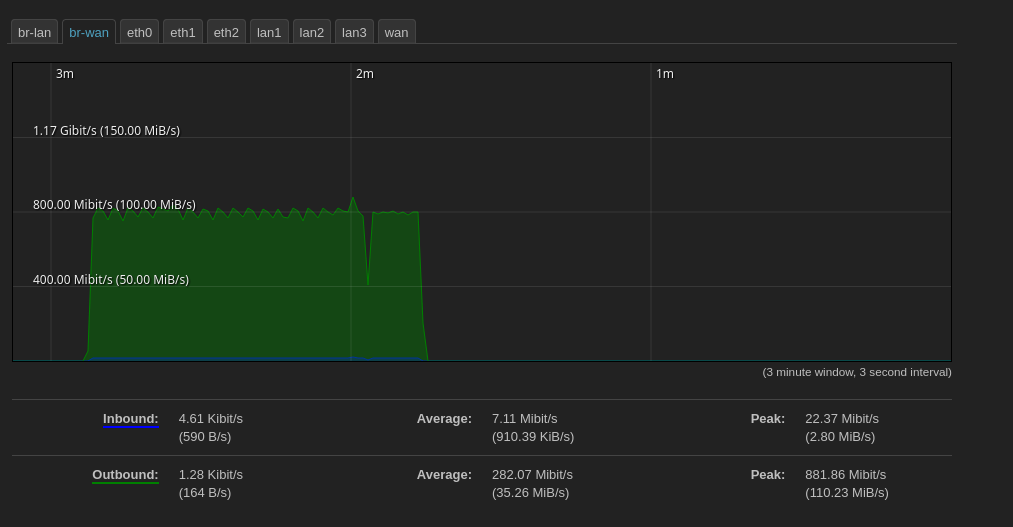
Mein erster Test war eine Übertragung vom R4 zum SMB-Client. Die Übertragungsrate war recht konstant bei etwa 800 Mbit/s.
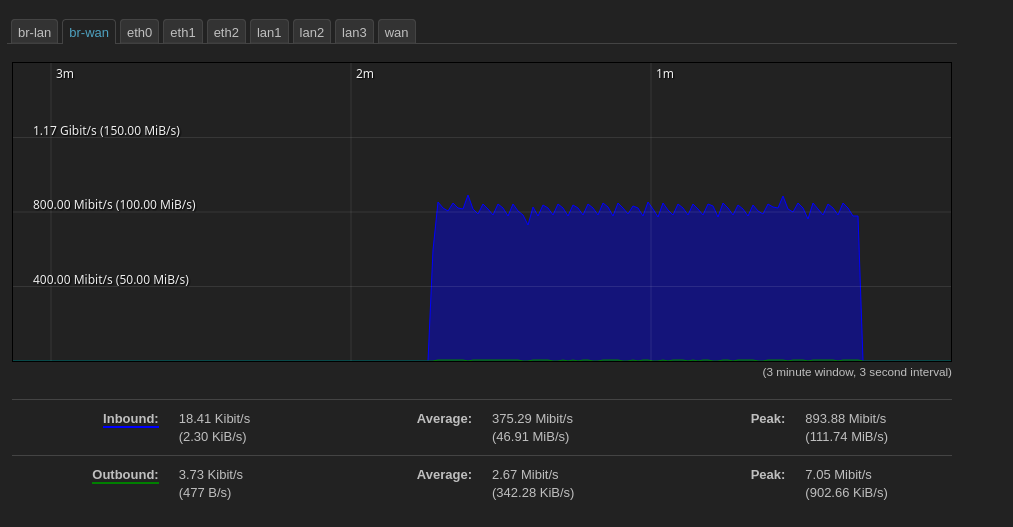
Der zweite Test war das Schreiben auf die SMB-Freigabe. Die Übertragungsraten waren fast exakt gleich wie bei den Lese-Benchmarks.
Ressourcen
R4
Anhang
Vollständiges Bootlog:
MMC read: dev # 0, block # 131072, count 256 ... 256 blocks read: OK

MMC read: dev # 0, block # 131072, count 25696 ... 25696 blocks read: OK
## Loading kernel from FIT Image at 50000000 ...
   Using 'config-mt7988a-bananapi-bpi-r4' configuration
   Trying 'kernel-1' kernel subimage
     Description:  ARM64 OpenWrt Linux-6.1.82
     Type:         Kernel Image
     Compression:  gzip compressed
     Data Start:   0x50001000
     Data Size:    5654911 Bytes = 5.4 MiB
     Architecture: AArch64
     OS:           Linux
     Load Address: 0x46000000
     Entry Point:  0x46000000
     Hash algo:    crc32
     Hash value:   bb01eb13
     Hash algo:    sha1
     Hash value:   9db3f4b09bdb852cd7dbd29bd908aeed2b9e6d6f
   Verifying Hash Integrity ... crc32+ sha1+ OK
## Loading fdt from FIT Image at 50000000 ...
   Using 'config-mt7988a-bananapi-bpi-r4' configuration
   Trying 'fdt-1' fdt subimage
     Description:  ARM64 OpenWrt bananapi_bpi-r4 device tree blob
     Type:         Flat Device Tree
     Compression:  uncompressed
     Data Start:   0x50566000
     Data Size:    43107 Bytes = 42.1 KiB
     Architecture: AArch64
     Load Address: 0x45f00000
     Hash algo:    crc32
     Hash value:   590fea91
     Hash algo:    sha1
     Hash value:   b3b8e5ec9316baee4c5420fbd4209e44ccd83339
   Verifying Hash Integrity ... crc32+ sha1+ OK
   Loading fdt from 0x50566000 to 0x45f00000
## Loading fdt from FIT Image at 50000000 ...
   Using 'mt7988a-bananapi-bpi-r4-sd' configuration
   Trying 'fdt-mt7988a-bananapi-bpi-r4-sd' fdt subimage
     Description:  ARM64 OpenWrt bananapi_bpi-r4 device tree overlay mt7988a-bananapi-bpi-r4-sd
     Type:         Flat Device Tree
     Compression:  uncompressed
     Data Start:   0x50573000
     Data Size:    1482 Bytes = 1.4 KiB
     Architecture: AArch64
     Hash algo:    crc32
     Hash value:   d0a3ad77
     Hash algo:    sha1
     Hash value:   4ddb0442509f1e0e66f70270ad0aad5b57894599
   Verifying Hash Integrity ... crc32+ sha1+ OK
## Loading fdt from FIT Image at 50000000 ...
Could not find configuration node
load of <NULL> failed
   Booting using the fdt blob at 0x45f00000
Working FDT set to 45f00000
## Loading loadables from FIT Image at 50000000 ...
   Trying 'rootfs-1' loadables subimage
     Description:  ARM64 OpenWrt bananapi_bpi-r4 rootfs
     Type:         Filesystem Image
     Compression:  uncompressed
     Data Start:   0x50575000
     Data Size:    7434240 Bytes = 7.1 MiB
     Hash algo:    crc32
     Hash value:   de66a025
     Hash algo:    sha1
     Hash value:   b6492862f0efe51591e8e78c8843aa4629291d1d
   Verifying Hash Integrity ... crc32+ sha1+ OK
   Uncompressing Kernel Image
   Loading Device Tree to 00000000fe7b4000, end 00000000fe7c0b0f ... OK
Working FDT set to fe7b4000
set /chosen/rootdisk to bootrom media: rootdisk-sd (phandle 0x0000009c)

Starting kernel ...

[    0.000000] Booting Linux on physical CPU 0x0000000000 [0x411fd090]
[    0.000000] Linux version 6.1.82 (builder@buildhost) (aarch64-openwrt-linux-musl-gcc (OpenWrt GCC 13.2.0 r25876-923d7c5531) 13.2.0, GNU ld (GNU Binutils) 2.40.0) #0 SMP Thu Apr 11 11:25:11 2024
[    0.000000] Machine model: Bananapi BPI-R4
[    0.000000] Zone ranges:
[    0.000000]   DMA      [mem 0x0000000040000000-0x00000000ffffffff]
[    0.000000]   DMA32    empty
[    0.000000]   Normal   [mem 0x0000000100000000-0x000000013fffffff]
[    0.000000] Movable zone start for each node
[    0.000000] Early memory node ranges
[    0.000000]   node   0: [mem 0x0000000040000000-0x0000000042ffffff]
[    0.000000]   node   0: [mem 0x0000000043000000-0x000000004304ffff]
[    0.000000]   node   0: [mem 0x0000000043050000-0x000000013fffffff]
[    0.000000] Initmem setup node 0 [mem 0x0000000040000000-0x000000013fffffff]
[    0.000000] psci: probing for conduit method from DT.
[    0.000000] psci: PSCIv1.1 detected in firmware.
[    0.000000] psci: Using standard PSCI v0.2 function IDs
[    0.000000] psci: MIGRATE_INFO_TYPE not supported.
[    0.000000] psci: SMC Calling Convention v1.4
[    0.000000] percpu: Embedded 18 pages/cpu s33896 r8192 d31640 u73728
[    0.000000] pcpu-alloc: s33896 r8192 d31640 u73728 alloc=18*4096
[    0.000000] pcpu-alloc: [0] 0 [0] 1 [0] 2 [0] 3
[    0.000000] Detected VIPT I-cache on CPU0
[    0.000000] CPU features: detected: GIC system register CPU interface
[    0.000000] CPU features: detected: Spectre-BHB
[    0.000000] CPU features: kernel page table isolation disabled by kernel configuration
[    0.000000] alternatives: applying boot alternatives
[    0.000000] Built 1 zonelists, mobility grouping on.  Total pages: 1032192
[    0.000000] Kernel command line: console=ttyS0,115200n1 pci=pcie_bus_perf root=/dev/fit0 rootwait
[    0.000000] Dentry cache hash table entries: 524288 (order: 10, 4194304 bytes, linear)
[    0.000000] Inode-cache hash table entries: 262144 (order: 9, 2097152 bytes, linear)
[    0.000000] mem auto-init: stack:off, heap alloc:off, heap free:off
[    0.000000] software IO TLB: area num 4.
[    0.000000] software IO TLB: mapped [mem 0x00000000fa7b4000-0x00000000fe7b4000] (64MB)
[    0.000000] Memory: 4034372K/4194304K available (8576K kernel code, 894K rwdata, 2468K rodata, 448K init, 304K bss, 159932K reserved, 0K cma-reserved)
[    0.000000] SLUB: HWalign=64, Order=0-3, MinObjects=0, CPUs=4, Nodes=1
[    0.000000] rcu: Hierarchical RCU implementation.
[    0.000000]  Tracing variant of Tasks RCU enabled.
[    0.000000] rcu: RCU calculated value of scheduler-enlistment delay is 10 jiffies.
[    0.000000] NR_IRQS: 64, nr_irqs: 64, preallocated irqs: 0
[    0.000000] GICv3: GIC: Using split EOI/Deactivate mode
[    0.000000] GICv3: 416 SPIs implemented
[    0.000000] GICv3: 0 Extended SPIs implemented
[    0.000000] Root IRQ handler: gic_handle_irq
[    0.000000] GICv3: GICv3 features: 16 PPIs
[    0.000000] GICv3: CPU0: found redistributor 0 region 0:0x000000000c080000
[    0.000000] rcu: srcu_init: Setting srcu_struct sizes based on contention.
[    0.000000] arch_timer: cp15 timer(s) running at 13.00MHz (phys).
[    0.000000] clocksource: arch_sys_counter: mask: 0xffffffffffffff max_cycles: 0x2ff89eacb, max_idle_ns: 440795202429 ns
[    0.000001] sched_clock: 56 bits at 13MHz, resolution 76ns, wraps every 4398046511101ns
[    0.000061] Calibrating delay loop (skipped), value calculated using timer frequency.. 26.00 BogoMIPS (lpj=130000)
[    0.000067] pid_max: default: 32768 minimum: 301
[    0.000271] Mount-cache hash table entries: 8192 (order: 4, 65536 bytes, linear)
[    0.000285] Mountpoint-cache hash table entries: 8192 (order: 4, 65536 bytes, linear)
[    0.000856] cacheinfo: Unable to detect cache hierarchy for CPU 0
[    0.001065] cblist_init_generic: Setting adjustable number of callback queues.
[    0.001068] cblist_init_generic: Setting shift to 2 and lim to 1.
[    0.001143] rcu: Hierarchical SRCU implementation.
[    0.001145] rcu:     Max phase no-delay instances is 1000.
[    0.001417] smp: Bringing up secondary CPUs ...
[    0.001637] Detected VIPT I-cache on CPU1
[    0.001685] cacheinfo: Unable to detect cache hierarchy for CPU 1
[    0.001692] GICv3: CPU1: found redistributor 1 region 0:0x000000000c0a0000
[    0.001711] CPU1: Booted secondary processor 0x0000000001 [0x411fd090]
[    0.001937] Detected VIPT I-cache on CPU2
[    0.001968] cacheinfo: Unable to detect cache hierarchy for CPU 2
[    0.001972] GICv3: CPU2: found redistributor 2 region 0:0x000000000c0c0000
[    0.001981] CPU2: Booted secondary processor 0x0000000002 [0x411fd090]
[    0.002205] Detected VIPT I-cache on CPU3
[    0.002238] cacheinfo: Unable to detect cache hierarchy for CPU 3
[    0.002242] GICv3: CPU3: found redistributor 3 region 0:0x000000000c0e0000
[    0.002251] CPU3: Booted secondary processor 0x0000000003 [0x411fd090]
[    0.002276] smp: Brought up 1 node, 4 CPUs
[    0.002280] SMP: Total of 4 processors activated.
[    0.002283] CPU features: detected: 32-bit EL0 Support
[    0.002285] CPU features: detected: CRC32 instructions
[    0.002303] spectre-bhb mitigation disabled by compile time option
[    0.002303] spectre-bhb mitigation disabled by compile time option
[    0.002303] spectre-bhb mitigation disabled by compile time option
[    0.002315] CPU features: emulated: Privileged Access Never (PAN) using TTBR0_EL1 switching
[    0.002317] CPU: All CPU(s) started at EL2
[    0.002318] alternatives: applying system-wide alternatives
[    0.005813] clocksource: jiffies: mask: 0xffffffff max_cycles: 0xffffffff, max_idle_ns: 19112604462750000 ns
[    0.005825] futex hash table entries: 1024 (order: 4, 65536 bytes, linear)
[    0.005930] pinctrl core: initialized pinctrl subsystem
[    0.006470] NET: Registered PF_NETLINK/PF_ROUTE protocol family
[    0.006748] DMA: preallocated 512 KiB GFP_KERNEL pool for atomic allocations
[    0.006856] DMA: preallocated 512 KiB GFP_KERNEL|GFP_DMA pool for atomic allocations
[    0.006952] DMA: preallocated 512 KiB GFP_KERNEL|GFP_DMA32 pool for atomic allocations
[    0.007194] thermal_sys: Registered thermal governor 'fair_share'
[    0.007196] thermal_sys: Registered thermal governor 'bang_bang'
[    0.007198] thermal_sys: Registered thermal governor 'step_wise'
[    0.007200] thermal_sys: Registered thermal governor 'user_space'
[    0.007243] ASID allocator initialised with 65536 entries
[    0.007704] printk: console [ramoops-1] enabled
[    0.007739] pstore: Registered ramoops as persistent store backend
[    0.007743] ramoops: using 0x10000@0x42ff0000, ecc: 0
[    0.015860] cryptd: max_cpu_qlen set to 1000
[    0.016607] SCSI subsystem initialized
[    0.016659] libata version 3.00 loaded.
[    0.017378] clocksource: Switched to clocksource arch_sys_counter
[    0.017790] NET: Registered PF_INET protocol family
[    0.017938] IP idents hash table entries: 65536 (order: 7, 524288 bytes, linear)
[    0.019834] tcp_listen_portaddr_hash hash table entries: 2048 (order: 3, 32768 bytes, linear)
[    0.019858] Table-perturb hash table entries: 65536 (order: 6, 262144 bytes, linear)
[    0.019872] TCP established hash table entries: 32768 (order: 6, 262144 bytes, linear)
[    0.019973] TCP bind hash table entries: 32768 (order: 8, 1048576 bytes, linear)
[    0.020381] TCP: Hash tables configured (established 32768 bind 32768)
[    0.020468] UDP hash table entries: 2048 (order: 4, 65536 bytes, linear)
[    0.020523] UDP-Lite hash table entries: 2048 (order: 4, 65536 bytes, linear)
[    0.020707] NET: Registered PF_UNIX/PF_LOCAL protocol family
[    0.020743] PCI: CLS 0 bytes, default 64
[    0.021537] workingset: timestamp_bits=46 max_order=20 bucket_order=0
[    0.023536] squashfs: version 4.0 (2009/01/31) Phillip Lougher
[    0.023547] jffs2: version 2.2 (NAND) (SUMMARY) (LZMA) (RTIME) (CMODE_PRIORITY) (c) 2001-2006 Red Hat, Inc.
[    0.042904] Block layer SCSI generic (bsg) driver version 0.4 loaded (major 250)
[    0.043686] mtk-xsphy soc:xphy@11e10000: failed to get ref_clk(id-1)
[    0.044173] mtk-pcie-gen3 11280000.pcie: host bridge /soc/pcie@11280000 ranges:
[    0.044193] mtk-pcie-gen3 11280000.pcie: Parsing ranges property...
[    0.044203] mtk-pcie-gen3 11280000.pcie:       IO 0x0020000000..0x00201fffff -> 0x0020000000
[    0.044215] mtk-pcie-gen3 11280000.pcie:      MEM 0x0020200000..0x0027ffffff -> 0x0020200000
[    0.044303] mtk-pcie-gen3 11290000.pcie: host bridge /soc/pcie@11290000 ranges:
[    0.044313] mtk-pcie-gen3 11290000.pcie: Parsing ranges property...
[    0.044322] mtk-pcie-gen3 11290000.pcie:       IO 0x0028000000..0x00281fffff -> 0x0028000000
[    0.044332] mtk-pcie-gen3 11290000.pcie:      MEM 0x0028200000..0x002fffffff -> 0x0028200000
[    0.044350] /soc/pcie@11290000: Failed to get clk index: 0 ret: -517
[    0.044358] mtk-pcie-gen3 11290000.pcie: failed to get clocks
[    0.044418] mtk-pcie-gen3 11300000.pcie: host bridge /soc/pcie@11300000 ranges:
[    0.044428] mtk-pcie-gen3 11300000.pcie: Parsing ranges property...
[    0.044437] mtk-pcie-gen3 11300000.pcie:       IO 0x0030000000..0x00301fffff -> 0x0030000000
[    0.044446] mtk-pcie-gen3 11300000.pcie:      MEM 0x0030200000..0x0037ffffff -> 0x0030200000
[    0.044462] /soc/pcie@11300000: Failed to get clk index: 0 ret: -517
[    0.044470] mtk-pcie-gen3 11300000.pcie: failed to get clocks
[    0.044542] mtk-pcie-gen3 11310000.pcie: host bridge /soc/pcie@11310000 ranges:
[    0.044552] mtk-pcie-gen3 11310000.pcie: Parsing ranges property...
[    0.044560] mtk-pcie-gen3 11310000.pcie:       IO 0x0038000000..0x00381fffff -> 0x0038000000
[    0.044569] mtk-pcie-gen3 11310000.pcie:      MEM 0x0038200000..0x003fffffff -> 0x0038200000
[    0.044584] /soc/pcie@11310000: Failed to get clk index: 0 ret: -517
[    0.044591] mtk-pcie-gen3 11310000.pcie: failed to get clocks
[    0.048489] Serial: 8250/16550 driver, 16 ports, IRQ sharing enabled
[    0.049888] printk: console [ttyS0] disabled
[    0.070023] 11000000.serial: ttyS0 at MMIO 0x11000000 (irq = 99, base_baud = 2500000) is a ST16650V2
[    0.960170] printk: console [ttyS0] enabled
[    0.984925] 11000100.serial: ttyS1 at MMIO 0x11000100 (irq = 100, base_baud = 2500000) is a ST16650V2
[    1.014594] 11000200.serial: ttyS2 at MMIO 0x11000200 (irq = 101, base_baud = 2500000) is a ST16650V2
[    1.024350] cacheinfo: Unable to detect cache hierarchy for CPU 0
[    1.032142] loop: module loaded
[    1.036470] spi-nand spi0.0: Winbond SPI NAND was found.
[    1.041804] spi-nand spi0.0: 128 MiB, block size: 128 KiB, page size: 2048, OOB size: 64
[    1.050024] 2 fixed-partitions partitions found on MTD device spi0.0
[    1.056379] OF: Bad cell count for /soc/spi@11007000/spi_nand@0/partitions
[    1.063256] OF: Bad cell count for /soc/spi@11007000/spi_nand@0/partitions
[    1.070245] Creating 2 MTD partitions on "spi0.0":
[    1.075028] 0x000000000000-0x000000200000 : "bl2"
[    1.081077] 0x000000200000-0x000008000000 : "ubi"
[    1.154226] ubi0: default fastmap pool size: 50
[    1.158759] ubi0: default fastmap WL pool size: 25
[    1.163539] ubi0: attaching mtd1
[    1.969949] ubi0: scanning is finished
[    1.983122] ubi0: attached mtd1 (name "ubi", size 126 MiB)
[    1.988607] ubi0: PEB size: 131072 bytes (128 KiB), LEB size: 126976 bytes
[    1.995470] ubi0: min./max. I/O unit sizes: 2048/2048, sub-page size 2048
[    2.002247] ubi0: VID header offset: 2048 (aligned 2048), data offset: 4096
[    2.009198] ubi0: good PEBs: 1008, bad PEBs: 0, corrupted PEBs: 0
[    2.015278] ubi0: user volume: 3, internal volumes: 1, max. volumes count: 128
[    2.022487] ubi0: max/mean erase counter: 2/0, WL threshold: 4096, image sequence number: 1697192243
[    2.031606] ubi0: available PEBs: 105, total reserved PEBs: 903, PEBs reserved for bad PEB handling: 20
[    2.040990] ubi0: background thread "ubi_bgt0d" started, PID 253
[    2.048577] block ubiblock0_1: created from ubi0:1(rootfs)
[    2.054056] ubiblock: device ubiblock0_1 (rootfs) set to be root filesystem
[    2.188781] i2c_dev: i2c /dev entries driver
[    2.208341] mtk-wdt 1001c000.watchdog: Watchdog enabled (timeout=31 sec, nowayout=0)
[    2.218020] mtk-msdc 11230000.mmc: Got CD GPIO
[    2.218162] NET: Registered PF_INET6 protocol family
[    2.227823] Segment Routing with IPv6
[    2.231486] In-situ OAM (IOAM) with IPv6
[    2.235424] NET: Registered PF_PACKET protocol family
[    2.240492] bridge: filtering via arp/ip/ip6tables is no longer available by default. Update your scripts to load br_netfilter if you need this.
[    2.253521] 8021q: 802.1Q VLAN Support v1.8
[    2.258464] pstore: Using crash dump compression: deflate
[    2.271897] phy phy-soc:xphy@11e10000.3: type_sw - reg 0x218, index 0
[    2.278903] mtk-pcie-gen3 11280000.pcie: host bridge /soc/pcie@11280000 ranges:
[    2.280677] mmc0: host does not support reading read-only switch, assuming write-enable
[    2.286212] mtk-pcie-gen3 11280000.pcie: Parsing ranges property...
[    2.296023] mmc0: new high speed SDXC card at address 0001
[    2.300460] mtk-pcie-gen3 11280000.pcie:       IO 0x0020000000..0x00201fffff -> 0x0020000000
[    2.306497] mmcblk0: mmc0:0001 JC2RT 59.6 GiB
[    2.314351] mtk-pcie-gen3 11280000.pcie:      MEM 0x0020200000..0x0027ffffff -> 0x0020200000
[    2.321917] Alternate GPT is invalid, using primary GPT.
[    2.333204]  mmcblk0: p1 p2 p3 p4 p5 p6 p7
[    2.657398] mtk-pcie-gen3 11280000.pcie: PCIe link down, current LTSSM state: detect.quiet (0x1)
[    2.666206] mtk-pcie-gen3: probe of 11280000.pcie failed with error -110
[    2.673242] mtk-pcie-gen3 11290000.pcie: host bridge /soc/pcie@11290000 ranges:
[    2.680557] mtk-pcie-gen3 11290000.pcie: Parsing ranges property...
[    2.686820] mtk-pcie-gen3 11290000.pcie:       IO 0x0028000000..0x00281fffff -> 0x0028000000
[    2.695255] mtk-pcie-gen3 11290000.pcie:      MEM 0x0028200000..0x002fffffff -> 0x0028200000
[    3.037396] mtk-pcie-gen3 11290000.pcie: PCIe link down, current LTSSM state: detect.quiet (0x1)
[    3.046175] mtk-pcie-gen3: probe of 11290000.pcie failed with error -110
[    3.053036] mtk-pcie-gen3 11300000.pcie: host bridge /soc/pcie@11300000 ranges:
[    3.060342] mtk-pcie-gen3 11300000.pcie: Parsing ranges property...
[    3.066601] mtk-pcie-gen3 11300000.pcie:       IO 0x0030000000..0x00301fffff -> 0x0030000000
[    3.075031] mtk-pcie-gen3 11300000.pcie:      MEM 0x0030200000..0x0037ffffff -> 0x0030200000
[    3.417399] mtk-pcie-gen3 11300000.pcie: PCIe link down, current LTSSM state: detect.quiet (0x1)
[    3.426177] mtk-pcie-gen3: probe of 11300000.pcie failed with error -110
[    3.433031] mtk-pcie-gen3 11310000.pcie: host bridge /soc/pcie@11310000 ranges:
[    3.440337] mtk-pcie-gen3 11310000.pcie: Parsing ranges property...
[    3.446595] mtk-pcie-gen3 11310000.pcie:       IO 0x0038000000..0x00381fffff -> 0x0038000000
[    3.455025] mtk-pcie-gen3 11310000.pcie:      MEM 0x0038200000..0x003fffffff -> 0x0038200000
[    3.797392] mtk-pcie-gen3 11310000.pcie: PCIe link down, current LTSSM state: detect.quiet (0x1)
[    3.806171] mtk-pcie-gen3: probe of 11310000.pcie failed with error -110
[    3.813714] FIT: Detected U-Boot 2024.01-OpenWrt-r25876-923d7c5531
[    3.819889] FIT: Selected configuration: "config-mt7988a-bananapi-bpi-r4" (OpenWrt bananapi_bpi-r4)
[    3.828930] FIT:           kernel sub-image 0x00001000..0x0056597e "kernel-1" (ARM64 OpenWrt Linux-6.1.82)
[    3.838666] FIT:          flat_dt sub-image 0x00566000..0x00570862 "fdt-1" (ARM64 OpenWrt bananapi_bpi-r4 device tree blob)
[    3.849877] FIT:          flat_dt sub-image 0x00571000..0x00571611 "fdt-mt7988a-bananapi-bpi-r4-emmc" (ARM64 OpenWrt bananapi_bpi-r4 device tree overlay mt7988a-bananapi-bpi-r4-emmc)
[    3.866209] FIT:          flat_dt sub-image 0x00572000..0x0057211c "fdt-mt7988a-bananapi-bpi-r4-rtc" (ARM64 OpenWrt bananapi_bpi-r4 device tree overlay mt7988a-bananapi-bpi-r4-rtc)
[    3.882364] FIT:          flat_dt sub-image 0x00573000..0x005735c9 "fdt-mt7988a-bananapi-bpi-r4-sd" (ARM64 OpenWrt bananapi_bpi-r4 device tree overlay mt7988a-bananapi-bpi-r4-sd)
[    3.898346] FIT:          flat_dt sub-image 0x00574000..0x005748eb "fdt-mt7988a-bananapi-bpi-r4-wifi-mt7996a" (ARM64 OpenWrt bananapi_bpi-r4 device tree overlay mt7988a-bananapi-bpi-r4-wifi-mt7996a)
[    3.916062] FIT:       filesystem sub-image 0x00575000..0x00c8bfff "rootfs-1" (ARM64 OpenWrt bananapi_bpi-r4 rootfs)
[    3.926906] block mmcblk0p7: mapped 1 uImage.FIT filesystem sub-image as /dev/fit0
[    3.934626] block mmcblk0p7: mapped remaing space as /dev/fitrw
[    4.068849] mtk_soc_eth 15100000.ethernet: generated random MAC address 65:74:68:25:64:00
[    4.077033] mtk_soc_eth 15100000.ethernet: generated random MAC address 65:74:68:25:64:00
[    4.085210] mtk_soc_eth 15100000.ethernet: generated random MAC address 65:74:68:25:64:00
[    4.095376] mtk_soc_eth 15100000.ethernet eth0: mediatek frame engine at 0xffffffc00a400000, irq 103
[    4.105008] mtk_soc_eth 15100000.ethernet eth1: mediatek frame engine at 0xffffffc00a400000, irq 103
[    4.114652] mtk_soc_eth 15100000.ethernet eth2: mediatek frame engine at 0xffffffc00a400000, irq 103
[    4.202948] mt7530-mmio 15020000.switch: configuring for fixed/internal link mode
[    4.210465] mt7530-mmio 15020000.switch: Link is Up - 10Gbps/Full - flow control rx/tx
[    4.234822] mt7530-mmio 15020000.switch wan (uninitialized): PHY [mt7530-0:00] driver [MediaTek MT7988 PHY] (irq=POLL)
[    4.270149] mt7530-mmio 15020000.switch lan1 (uninitialized): PHY [mt7530-0:01] driver [MediaTek MT7988 PHY] (irq=POLL)
[    4.305433] mt7530-mmio 15020000.switch lan2 (uninitialized): PHY [mt7530-0:02] driver [MediaTek MT7988 PHY] (irq=POLL)
[    4.340676] mt7530-mmio 15020000.switch lan3 (uninitialized): PHY [mt7530-0:03] driver [MediaTek MT7988 PHY] (irq=POLL)
[    4.351708] device eth0 entered promiscuous mode
[    4.356331] DSA: tree 0 setup
[    4.359930] UBI: auto-attach mtd1
[    4.363238] ubi: mtd1 is already attached to ubi0
[    4.367938] UBI error: cannot attach mtd1
[    4.377758] VFS: Mounted root (squashfs filesystem) readonly on device 259:0.
[    4.384983] Freeing unused kernel memory: 448K
[    4.437462] Run /sbin/init as init process
[    4.441549]   with arguments:
[    4.444505]     /sbin/init
[    4.447201]   with environment:
[    4.450336]     HOME=/
[    4.452685]     TERM=linux
[    4.571512] init: Console is alive
[    4.575020] init: - watchdog -
[    4.858200] kmodloader: loading kernel modules from /etc/modules-boot.d/*
[    4.879521] usbcore: registered new interface driver usbfs
[    4.885027] usbcore: registered new interface driver hub
[    4.890377] usbcore: registered new device driver usb
[    4.898546] xhci-mtk 11200000.usb: supply vbus not found, using dummy regulator
[    4.905923] xhci-mtk 11200000.usb: supply vusb33 not found, using dummy regulator
[    4.913808] xhci-mtk 11200000.usb: xHCI Host Controller
[    4.919079] xhci-mtk 11200000.usb: new USB bus registered, assigned bus number 1
[    4.929513] xhci-mtk 11200000.usb: hcc params 0x01403f99 hci version 0x110 quirks 0x0000000000210010
[    4.938674] xhci-mtk 11200000.usb: irq 112, io mem 0x11200000
[    4.944485] xhci-mtk 11200000.usb: xHCI Host Controller
[    4.949708] xhci-mtk 11200000.usb: new USB bus registered, assigned bus number 2
[    4.957094] xhci-mtk 11200000.usb: Host supports USB 3.2 Enhanced SuperSpeed
[    4.964391] hub 1-0:1.0: USB hub found
[    4.968155] hub 1-0:1.0: 1 port detected
[    4.972251] usb usb2: We don't know the algorithms for LPM for this host, disabling LPM.
[    4.980525] hub 2-0:1.0: USB hub found
[    4.984280] hub 2-0:1.0: 1 port detected
[    4.990460] kmodloader: done loading kernel modules from /etc/modules-boot.d/*
[    5.002384] init: - preinit -
[    5.216513] mtk_soc_eth 15100000.ethernet eth0: configuring for fixed/internal link mode
[    5.224668] mtk_soc_eth 15100000.ethernet eth0: Link is Up - 10Gbps/Full - flow control rx/tx
[    5.231243] mt7530-mmio 15020000.switch lan1: configuring for phy/internal link mode
[    5.241091] IPv6: ADDRCONF(NETDEV_CHANGE): eth0: link becomes ready
Press the [f] key and hit [enter] to enter failsafe mode
Press the [1], [2], [3] or [4] key and hit [enter] to select the debug level
[    5.357551] usb 2-1: new SuperSpeed USB device number 2 using xhci-mtk
[    5.390061] hub 2-1:1.0: USB hub found
[    5.393972] hub 2-1:1.0: 4 ports detected
[    5.537383] usb 1-1: new high-speed USB device number 2 using xhci-mtk
[    5.719611] hub 1-1:1.0: USB hub found
[    5.723505] hub 1-1:1.0: 5 ports detected
[    6.427383] usb 1-1.5: new high-speed USB device number 3 using xhci-mtk
[    6.647380] random: crng init done
[    7.442728] EXT4-fs (fitrw): recovery complete
[    7.448501] EXT4-fs (fitrw): mounted filesystem with ordered data mode. Quota mode: disabled.
[    7.458300] mount_root: switching to ext4 overlay
[    7.463985] overlayfs: null uuid detected in lower fs '/', falling back to xino=off,index=off,nfs_export=off.
[    7.474833] urandom-seed: Seeding with /etc/urandom.seed
[    7.509760] procd: - early -
[    7.512683] procd: - watchdog -
[    8.040210] procd: - watchdog -
[    8.043652] procd: - ubus -
[    8.098331] procd: - init -
Please press Enter to activate this console.
[    8.235752] kmodloader: loading kernel modules from /etc/modules.d/*
[    8.249461] i2c i2c-1: Added multiplexed i2c bus 2
[    8.254323] i2c i2c-1: Added multiplexed i2c bus 3
[    8.259215] i2c i2c-1: Added multiplexed i2c bus 4
[    8.264114] i2c i2c-1: Added multiplexed i2c bus 5
[    8.268924] pca954x 1-0070: registered 4 multiplexed busses for I2C switch pca9545
[    8.289347] crypto-safexcel 15600000.crypto: can't request region for resource [mem 0x15600000-0x1577ffff]
[    8.299014] crypto-safexcel 15600000.crypto: failed to get resource
[    8.305270] crypto-safexcel: probe of 15600000.crypto failed with error -16
[    8.315614] at24 2-0050: supply vcc not found, using dummy regulator
[    8.349315] at24 2-0057: supply vcc not found, using dummy regulator
[    8.356244] at24 2-0057: 256 byte 24c02 EEPROM, writable, 1 bytes/write
[    8.363276] Loading modules backported from Linux version v6.6.15-0-g51f354b815c4
[    8.366097] urngd: v1.0.2 started.
[    8.370753] Backport generated by backports.git 193becf2
[    8.382136] sfp sfp1: Host maximum power 3.0W
[    8.386990] sfp sfp2: Host maximum power 3.0W
[    8.418130] PPP generic driver version 2.4.2
[    8.423116] NET: Registered PF_PPPOX protocol family
[    8.429520] kmodloader: done loading kernel modules from /etc/modules.d/*
[    9.907036] mtk_soc_eth 15100000.ethernet eth0: Link is Down
[    9.919417] mtk_soc_eth 15100000.ethernet eth0: configuring for fixed/internal link mode
[    9.927628] mtk_soc_eth 15100000.ethernet eth0: Link is Up - 10Gbps/Full - flow control rx/tx
[    9.929247] mt7530-mmio 15020000.switch lan1: configuring for phy/internal link mode
[    9.944819] IPv6: ADDRCONF(NETDEV_CHANGE): eth0: link becomes ready
[    9.951187] br-lan: port 1(lan1) entered blocking state
[    9.956404] br-lan: port 1(lan1) entered disabled state
[    9.961760] device lan1 entered promiscuous mode
[    9.970720] mt7530-mmio 15020000.switch lan2: configuring for phy/internal link mode
[    9.979599] br-lan: port 2(lan2) entered blocking state
[    9.984836] br-lan: port 2(lan2) entered disabled state
[    9.990306] device lan2 entered promiscuous mode
[    9.997251] mt7530-mmio 15020000.switch lan3: configuring for phy/internal link mode
[   10.006092] br-lan: port 3(lan3) entered blocking state
[   10.011337] br-lan: port 3(lan3) entered disabled state
[   10.016720] device lan3 entered promiscuous mode
[   10.022920] mtk_soc_eth 15100000.ethernet eth1: configuring for inband/10gbase-r link mode
[   10.055213] br-lan: port 4(eth1) entered blocking state
[   10.060457] br-lan: port 4(eth1) entered disabled state
[   10.065824] device eth1 entered promiscuous mode
[   10.073380] mt7530-mmio 15020000.switch wan: configuring for phy/internal link mode
[   10.082156] br-wan: port 1(wan) entered blocking state
[   10.087294] br-wan: port 1(wan) entered disabled state
[   10.092603] device wan entered promiscuous mode
[   10.099862] mtk_soc_eth 15100000.ethernet eth2: configuring for inband/10gbase-r link mode
[   10.132049] br-wan: port 2(eth2) entered blocking state
[   10.137283] br-wan: port 2(eth2) entered disabled state
[   10.142639] device eth2 entered promiscuous mode
BusyBox v1.36.1 (2024-04-11 11:25:11 UTC) built-in shell (ash)

  _______                     ________        __
 |       |.-----.-----.-----.|  |  |  |.----.|  |_
 |   -   ||  _  |  -__|     ||  |  |  ||   _||   _|
 |_______||   __|_____|__|__||________||__|  |____|
          |__| W I R E L E S S   F R E E D O M
 -----------------------------------------------------
 OpenWrt SNAPSHOT, r25876-923d7c5531
 -----------------------------------------------------
=== WARNING! =====================================
There is no root password defined on this device!
Use the "passwd" command to set up a new password
in order to prevent unauthorized SSH logins.
--------------------------------------------------