Siehe auch meinen neueren Banana Pi R4 Testbericht.
Banana Pi BPI-R3
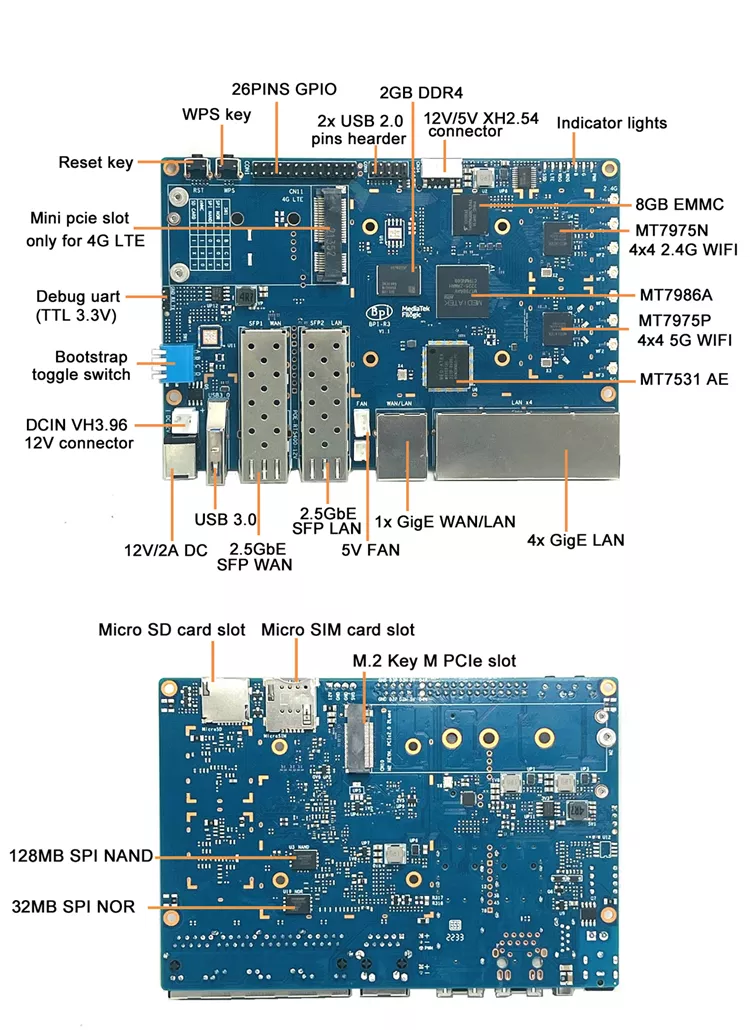
Das Sinovoip Banana Pi BPI-R3 Testgerät kommt in einer ESD-Tüte in einem Karton. Es gibt kein Zubehör, keine Kabel, keine Kurzanleitung, nur das nackte Gerät. Auf dem europäischen Markt ist es z.B. bei Amazon als Kit oder ohne Gehäuse erhältlich. Das Kit enthält zusätzlich: - Netzteil - Metallgehäuse - 8 x Antenne - 8 x Pigtail - Serieller Adapter
Das Gehäuse kann auch separat gekauft werden. Die Preise variieren etwas, meist liegen sie für ein Kit unter 200 €.
Erster Start
Zunächst musste ich herausfinden, welches Netzteil ich verwenden sollte. Es muss bis zu 2 Ampere bei 12 Volt liefern können. Glücklicherweise habe ich ausreichend Netzteile in meinem Labor, also ist es buchstäblich Plug & Play. Die rote Power-LED leuchtet auf, sobald man das Netzteil anschließt. Es gibt eine Reihe von 7 LEDs, die wie folgt beschriftet sind:
- PWR
- G
- B
- W2G
- W5G
- LTE
- SSD
Ich konnte keine genauen Spezifikationen zu jeder dieser LEDs finden. Einige sind selbsterklärend, aber ich konnte nicht herausfinden, wofür die G- und B-LEDs stehen.
Folgendes erscheint auf der seriellen Konsole, wenn es kein bootfähiges Medium gibt.
F0: 102B 0000
FA: 1040 0000
FA: 1040 0000 [0200]
F9: 103F 0000
F3: 1001 0000 [0200]
F3: 1001 0000
F6: 300C 0028
F5: 480A 0031
00: 1005 0000
FA: 1040 0000
FA: 1040 0000 [0200]
F9: 103F 0000
F3: 1001 0000 [0200]
F3: 1001 0000
F6: 300C 0028
01: 102A 0001
02: 1005 0000
BP: 2000 00C0 [0001]
EC: 0000 0000 [3000]
T0: 0000 010F [010F]
System halt!
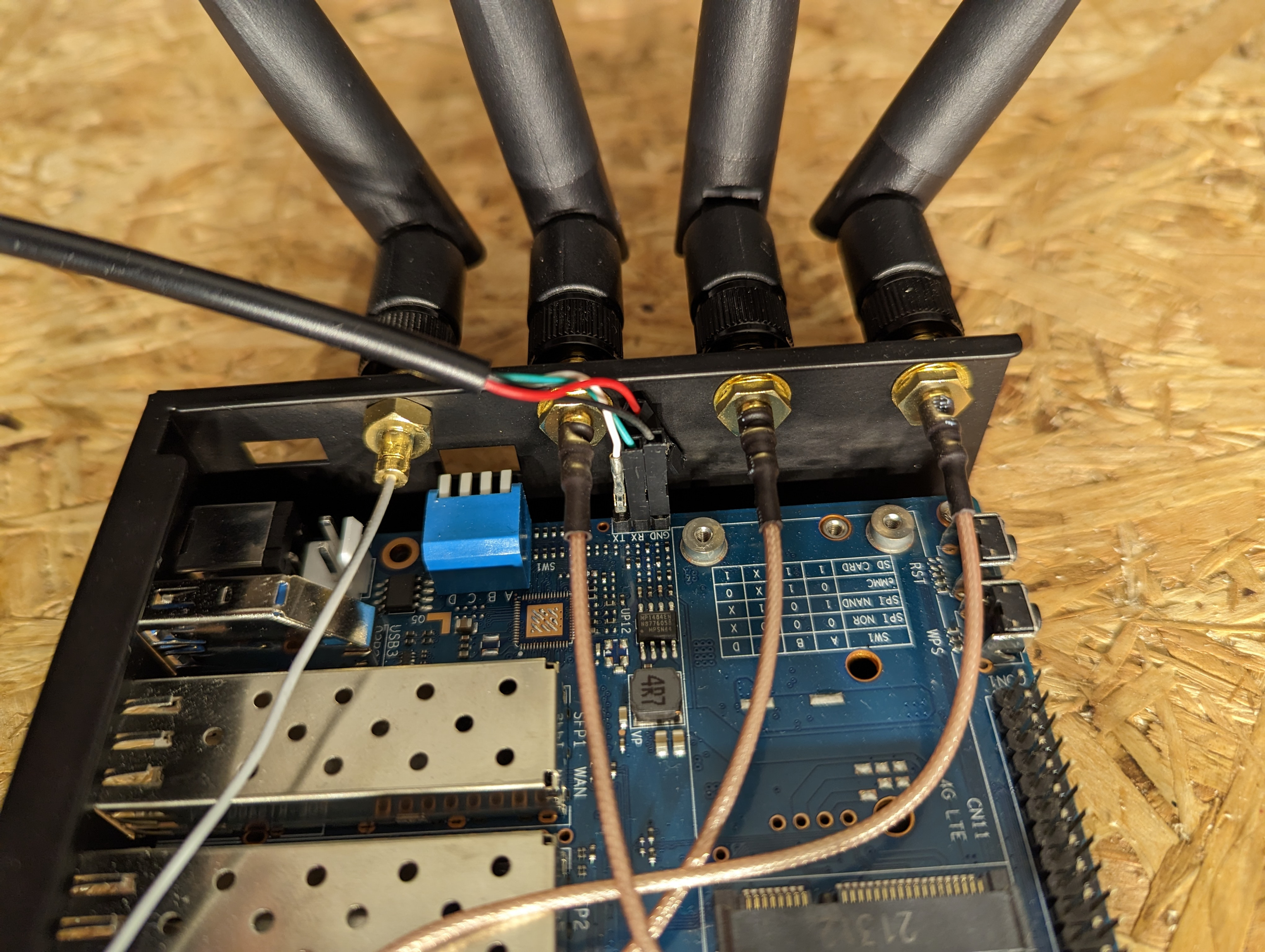
Um überhaupt eine Ausgabe zu sehen, habe ich meinen USB-auf-seriell-Adapter direkt an den 3-poligen UART-Seriell-Port auf dem Board angeschlossen.
Technische Daten
Der Banana BPI-R3 ist ein herausragendes Gerät, wenn es um die technische Spezifikation geht. Auf unterschiedlichen Ebenen bietet er Features, die bei anderen Geräten oft fehlen. Hier eine kurze Liste der Highlights:
- SoC Mediatek MT7986/Filogic 830 ARM Cortex-A53 mit 4 Kernen und einem Takt von 2 GHz
- Dual SFP 2.5G Ports
- ein Mini-PCI-Express-Steckplatz (via USB) für LTE-Modem 4G
- ein Onboard-Micro-SIM-Slot für das optionale LTE-Modem
- Ein eingebauter 8 GB eMMC-Flashspeicher
- Eingebaute Wifi6-Unterstützung via
- MT7975N für 2,4 GHz, mit 4Wifi-IPX-Ports
- MT7975P für 5 GHz, mit 4 Wifi-IPX-Ports
- insgesamt 8 Antennenports
- 2 GB RAM DDR
- 1 USB-3.0-Port
- Micro-SD-Kartensteckplatz
- M.2-NVME-SSD-Port mit PCIe Gen2 x2
- Onboard 128 MB SPI NAND-Speicher
- Onboard 32 MB SPI NOR-Speicher
- GPIO-Pins (26)
- 2 x USB2-Onboard-Header
- 1 x 1G Ethernet WAN-Port
- Integrierter Mediatek MT7531 Switch
- 4 x 1G Ethernet LAN-Ports
- Reset-Taste
- WPS-Taste
2.5G-Netzwerk
Ich denke, ein Wort zum 2.5G-Netzwerk heutzutage muss gesagt werden. Es scheint eine valide Option zu sein, da 5G- und 10G-Equipment noch etwas teuer und stromhungrig ist. Dennoch ist 2.5G nicht sehr verbreitet. Versuchen Sie mal, ein 2.5G-kompatibles SFP-Modul für Glasfasser (LR/SR) zu finden. Die sind ziemlich selten. Eins, das ich finden konnte, war das TP-Link TL-SM411LSA (Glasfaser), das leider in Europa nicht wie das TL-SM410U (Kupfer) von TP-Link erhältlich ist. Beide Adapter wurden vom Hersteller getestet. Ich habe ein Modul ausprobiert, das wie eine gute Wahl schien, es aber tatsächlich nicht ist: Mikrotik S+RJ10, das Raten von 1G/2.5G und 10G unterstützt, aber vom Banana Pi nicht erkannt wurde. Wahrscheinlich, weil es ein SFP+ ist, während der Pi nur SFP verwendet.
Mon Nov 21 19:54:42 2022 kern.info kernel: [   48.606834] sfp sfp2: module MikroTik         S+RJ10           rev 2.16 sn F06003AE68AB     dc 220214
Mon Nov 21 19:54:42 2022 kern.warn kernel: [   48.616225] sfp sfp2: Host does not support 1.5W modules, module left in power mode 1
Mon Nov 21 19:54:42 2022 kern.err kernel: [   48.624053] mt7530 mdio-bus:1f sfp2: vali[   48.665987] hwmon hwmon3: temp1_input not attached to any thermal zone
dation of inband/10gbase-r with support 0000000,00000400,000060c0 failed: -22
Mon Nov 21 19:54:42 2022 kern.info kernel: [   48.665987] hwmon hwmon3: temp1_input not attached to any thermal zone
Das günstigste Kupfer-SFP-Modul für 2.5G-Ethernet, das ich finden konnte, war das SFP-2.5G-T von fs.com für rund 50 €. Auch Switches mit 2.5G sind noch nicht sehr verbreitet. Positiv anzumerken ist der recht geringe Stromverbrauch, und PCIe-Ethernet-Adapter mit guten Chipsätzen wie Intel gibt es ab 30–40 € pro Stück.
2.5G-Ethernet kann eine vernünftige Entscheidung für ein Upgrade sein. Es ist schnell genug, um mit simultanen Bandbreiten von Wifi 6 mitzuhalten, es ist erschwinglich und verbraucht eine angemessene Menge an Strom. Wenn Sie sich also für 2.5G entscheiden, könnte der Banana Pi BPI-R3 eine wirklich gute Wahl für Sie sein.
Für meinen Testbericht konnte ich jedoch keine SFP-Module finden, die mit dem Banana Pi funktionierten. Anfangs wollte ich eine Glasfaserverbindung haben. Nur zum Spaß: Suchen Sie mal nach einer NIC, die 2.5G-Ethernet unterstützt und SFP-Ports bietet. Nur diese würden sich für eine Glasfaserverbindung eignen. Alle Adapter, die ich finden konnte, waren rein kupferbasiert. Am Ende habe ich es nicht geschafft, 2.5G-Ethernet zum Laufen zu bringen, sodass alle meine WLAN-Benchmarks nur mit 1G durchgeführt wurden.
Booten
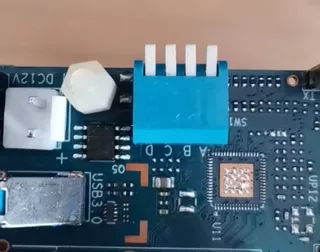
Das Gerät kommt mit OpenWrt 21.02-SNAPSHOT vorinstalliert, sowohl auf dem NAND- als auch auf dem NOR-Chip. Es ist etwas schwierig herauszufinden, wie man zwischen Boot-Medien wählt. Es gibt einen 4-Kanal-Dip-Switch an der Seite des Geräts. Die Beschriftung ist etwas verwirrend. Auf der einen Seite steht:
(1) (2) (3) (4)
auf der anderen Seite:
(A) (B) (C) (D)
Im Wiki verwenden sie:
(SW1-A) (SW1-B) (SW1-C) (SW1-D)
Ich verwende die folgende Notation. So wählen Sie das Boot-Medium aus:
| Jumper-Einstellung | (1) | (2) | (3) | (4) |
|---|---|---|---|---|
| SPIM-NOR |  |
|
|
 |
| SPIM-NAND |  |
|
|
|
| eMMC | |
|
|
|
| SD | |
|
|
|
-> Schalter nach unten stellen
-> Schalter nach oben stellen
-> egal ob oben oder unten
Leider ist das Booten von der M.2-NVME-SSD nicht möglich, sodass dies nur eine Option für zusätzlichen Massenspeicher ist.
Vanilla OpenWrt installieren
Zuallererst: OpenWrt installieren. Das letzte stabile Release 22.03.2 unterstützt das Gerät noch nicht, ich muss das Snapshot-Image für SD-Karte herunterladen. So wird es auf eine Micro-SD-Karte geflasht.
wget https://downloads.openwrt.org/snapshots/targets/mediatek/filogic/openwrt-mediatek-filogic-bananapi_bpi-r3-sdcard.img.gz
--2022-11-19 14:22:20--  https://downloads.openwrt.org/snapshots/targets/mediatek/filogic/openwrt-mediatek-filogic-bananapi_bpi-r3-sdcard.img.gz
Loaded CA certificate '/etc/ssl/certs/ca-certificates.crt'
Resolving downloads.openwrt.org (downloads.openwrt.org)... 2a01:4f8:251:321::2, 168.119.138.211
Connecting to downloads.openwrt.org (downloads.openwrt.org)|2a01:4f8:251:321::2|:443... connected.
HTTP request sent, awaiting response... 200 OK
Length: 21353937 (20M) [application/octet-stream]
Saving to: 'openwrt-mediatek-filogic-bananapi_bpi-r3-sdcard.img.gz'

openwrt-mediatek-filogic-bananapi_bpi-r3-sdcard 100%[=====================================================================================================>]  20,36M  2,63MB/s    in 6,0s

2022-11-19 14:22:27 (3,39 MB/s) - 'openwrt-mediatek-filogic-bananapi_bpi-r3-sdcard.img.gz' saved [21353937/21353937]

sudo dd bs=4M if=openwrt-mediatek-filogic-bananapi_bpi-r3-sdcard.img of=/dev/sda
sudo sync
Der erste Versuch funktionierte bereits. Das vollständige Bootlog findet sich im Anhang. SD-Karte und der integrierte eMMC können nicht gleichzeitig verwendet werden, da sie sich dieselbe Schnittstelle auf dem SoC teilen. Da Snapshot-Images typischerweise ohne WebGUI kommen, installiere ich diese zuerst.
Diese Vorabversion von Vanilla OpenWrt habe ich für alle meine Tests und Benchmarks verwendet, es ist OpenWrt SNAPSHOT, r21629-9d8eff6799
WLAN
Es waren keine zusätzlichen Pakete erforderlich, um WLAN-Unterstützung zu erhalten. Der integrierte MediaTek MT7986 unterstützt sowohl 5 als auch 2,5 GHz mit Unterstützung für Wifi 6 (aka 802.11ax). So sieht der WLAN-Status aus:
root@OpenWrt:/etc/config# wifi status
{
    "radio0": {
        "up": false,
        "pending": false,
        "autostart": true,
        "disabled": true,
        "retry_setup_failed": false,
        "config": {
            "path": "platform/soc/18000000.wmac",
            "channel": "1",
            "band": "2g",
            "htmode": "HE20",
            "disabled": true
        },
        "interfaces": [
            {
                "section": "default_radio0",
                "config": {
                    "mode": "ap",
                    "ssid": "OpenWrt",
                    "encryption": "none",
                    "network": [
                        "lan"
                    ],
                    "mode": "ap"
                },
                "vlans": [

                ],
                "stations": [

                ]
            }
        ]
    },
    "radio1": {
        "up": false,
        "pending": false,
        "autostart": true,
        "disabled": true,
        "retry_setup_failed": false,
        "config": {
            "path": "platform/soc/18000000.wmac+1",
            "channel": "36",
            "band": "5g",
            "htmode": "HE80",
            "disabled": true
        },
        "interfaces": [
            {
                "section": "default_radio1",
                "config": {
                    "mode": "ap",
                    "ssid": "OpenWrt",
                    "encryption": "none",
                    "network": [
                        "lan"
                    ],
                    "mode": "ap"
                },
                "vlans": [

                ],
                "stations": [

                ]
            }
        ]
    }
}
Das Board verfügt über acht IPX-Antennenanschlüsse, vier für 2,4 GHz und vier für 5 GHz. Wie diese Dokumentation zeigt, unterstützen die integrierten WLAN-Chips 4×4 MIMO für sowohl 2,4 als auch 5 GHz. Im Datenblatt von Mediatek steht:
Support Dual band Dual Concurrent
Während meiner Tests konnte ich jedoch kein Concurrent Dual Band zum Laufen bringen,
Um einige Zahlen zu bekommen, habe ich iperf3 auf dem RPi3 selbst installiert und gestartet und mit einem Lenovo T14 Gen1 AMD und einem Intel Corporation Wi-Fi 6 AX200 (rev 1a) getestet.
Dies ist die OpenWrt-WLAN-Konfiguration für meine Benchmarks:
config wifi-device 'radio0'
        option type 'mac80211'
        option path 'platform/soc/18000000.wmac'
        option band '2g'
        option cell_density '0'
        option htmode 'HE40'
        option channel '9'
        option txpower '20'

config wifi-iface 'default_radio0'
        option device 'radio0'
        option network 'lan'
        option mode 'ap'
        option ssid 'bench'
        option encryption 'sae'
        option key 'temppw'

config wifi-device 'radio1'
        option type 'mac80211'
        option path 'platform/soc/18000000.wmac+1'
        option band '5g'
        option cell_density '0'
        option htmode 'HE80'
        option txpower '20'
        option channel 'auto'

config wifi-iface 'default_radio1'
        option device 'radio1'
        option network 'lan'
        option mode 'ap'
        option ssid 'bench'
        option encryption 'sae'
        option key 'temppw'
Dies sind die Ergebnisse:
iperf3 -c 192.168.1.1 ✔ 10s
Connecting to host 192.168.1.1, port 5201
[ 5] local 192.168.1.191 port 32960 connected to 192.168.1.1 port 5201
[ ID] Interval Transfer Bitrate Retr Cwnd
[ 5] 0.00-1.00 sec 95.6 MBytes 802 Mbits/sec 0 2.78 MBytes
[ 5] 1.00-2.00 sec 109 MBytes 913 Mbits/sec 0 3.03 MBytes
[ 5] 2.00-3.00 sec 108 MBytes 902 Mbits/sec 0 3.03 MBytes
[ 5] 3.00-4.00 sec 76.2 MBytes 640 Mbits/sec 0 3.03 MBytes
[ 5] 4.00-5.00 sec 40.0 MBytes 336 Mbits/sec 1 3.03 MBytes
[ 5] 5.00-6.00 sec 85.0 MBytes 713 Mbits/sec 0 3.03 MBytes
[ 5] 6.00-7.00 sec 106 MBytes 891 Mbits/sec 0 3.03 MBytes
[ 5] 7.00-8.00 sec 106 MBytes 891 Mbits/sec 0 3.03 MBytes
[ 5] 8.00-9.00 sec 108 MBytes 902 Mbits/sec 0 3.03 MBytes
[ 5] 9.00-10.00 sec 102 MBytes 860 Mbits/sec 0 3.03 MBytes
- - - - - - - - - - - - - - - - - - - - - - - - -
[ ID] Interval Transfer Bitrate Retr
[ 5] 0.00-10.00 sec 936 MBytes 785 Mbits/sec 1 sender
[ 5] 0.00-10.01 sec 934 MBytes 783 Mbits/sec receiver
iperf Done.
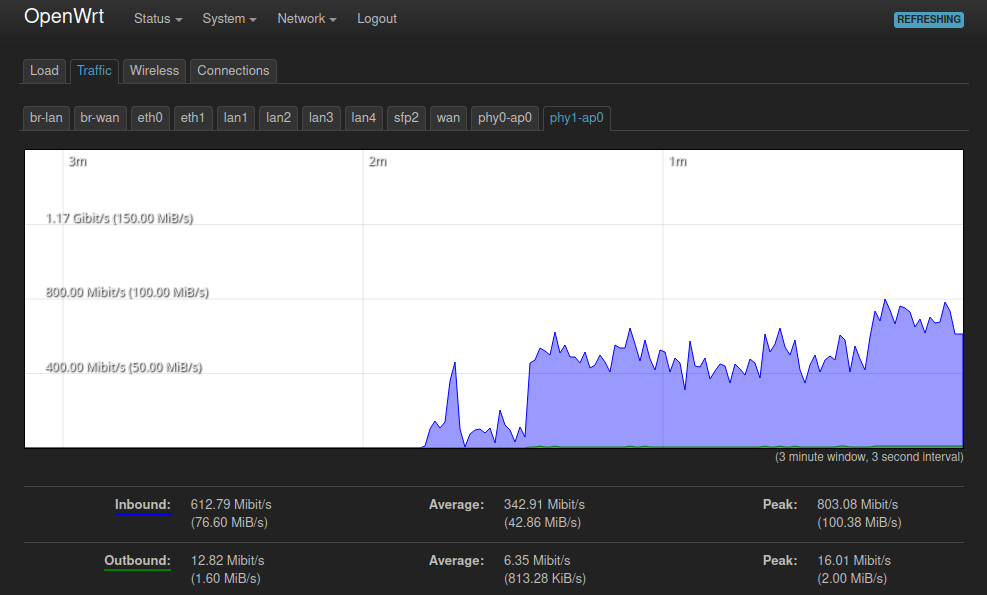 Dies ist ein Traffic-Graph der 5GHz-Schnittstelle während eines iperf3-Tests.
CPU-Benchmarks
Um einige Zahlen darüber zu bekommen, welche CPU-Leistung man erwarten kann, habe ich einige OpenSSL-Benchmarks durchgeführt. Bitte konsultieren Sie diese Seite für weitere Informationen darüber, wie der Test durchgeführt wird. Einen Vergleich mit weiteren verschiedenen Systemen finden Sie auf dieser Seite. Ich habe drei verschiedene Geräte benchmarked: - Deciso DEC740 - PC Engines APU4D4 - Banana Pi Bpi-r3
Hashes
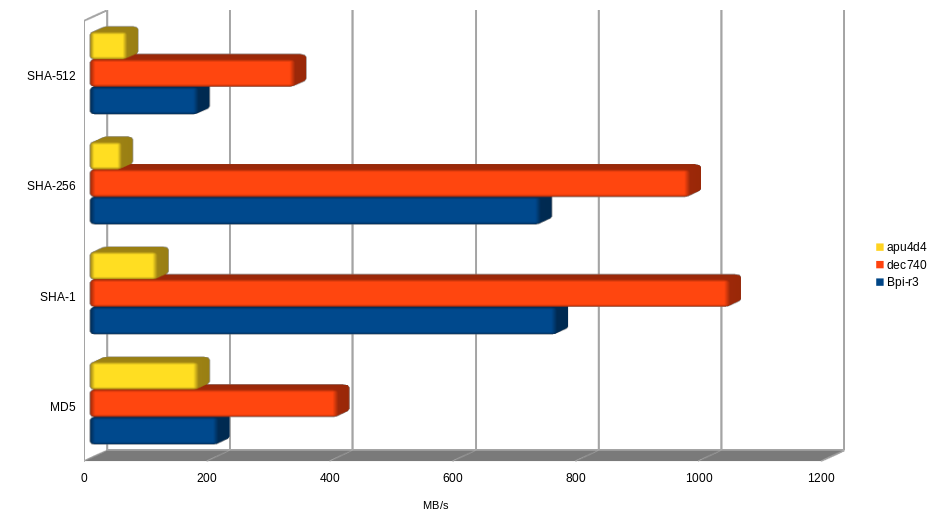
Werte in MB/s (1 MB = 1.000.000 Bytes) Höher ist besser
| Gerät | MD5 | SHA-1 | SHA-256 | SHA-512 |
|---|---|---|---|---|
| Bpi-r3 | 208,86221 | 760,25424 | 733,88059 | 176,53555 |
| dec740 | 403,88574 | 1041,77118 | 976,66389 | 333,8281 |
| apu4d4 | 176,59563 | 109,61047 | 51,58117 | 60,28654 |
Crypto
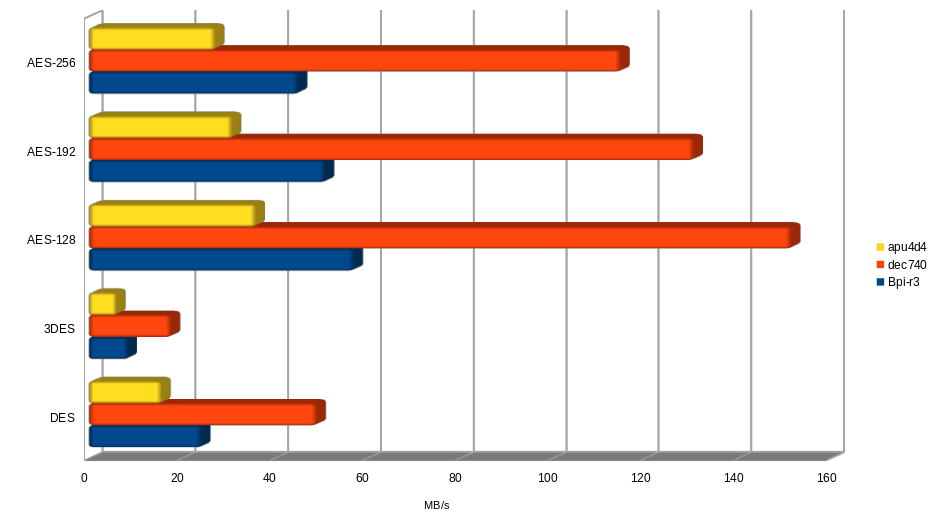
Werte in MB/s (1 MB = 1.000.000 Bytes) Höher ist besser
| Gerät | DES | 3DES | AES-128 | AES-192 | AES-256 |
|---|---|---|---|---|---|
| Bpi-r3 | 24,30031 | 8,42934 | 57,23338 | 50,99657 | 45,17342 |
| dec740 | 49,22709 | 17,73636 | 151,5578 | 130,53065 | 114,74193 |
| apu4d4 | 15,70167 | 5,97129 | 36,04992 | 30,94528 | 27,28448 |
RSA/DSA Sign Verify
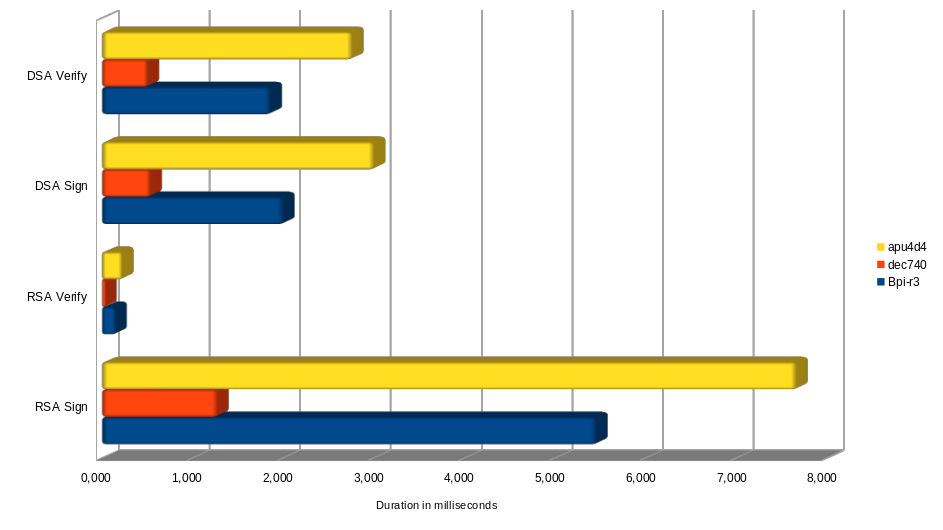
Dauer in Millisekunden Niedriger ist besser
| Gerät | RSA Sign | RSA Verify | DSA Sign | DSA Verify |
|---|---|---|---|---|
| Bpi-r3 | 5,458 | 0,150 | 2,003 | 1,863 |
| dec740 | 1,276 | 0,039 | 0,536 | 0,508 |
| apu4d4 | 7,665 | 0,223 | 3,004 | 2,763 |
Signaturen / Verifikationen pro Sekunde Höher ist besser
| Gerät | RSA Sign | RSA Verify | DSA Sign | DSA Verify |
|---|---|---|---|---|
| Bpi-r3 | 183,2 | 6683,3 | 499,2 | 536,7 |
| dec740 | 783,8 | 25588,8 | 1866 | 1969,6 |
| apu4d4 | 130,5 | 4489,2 | 332,9 | 362 |
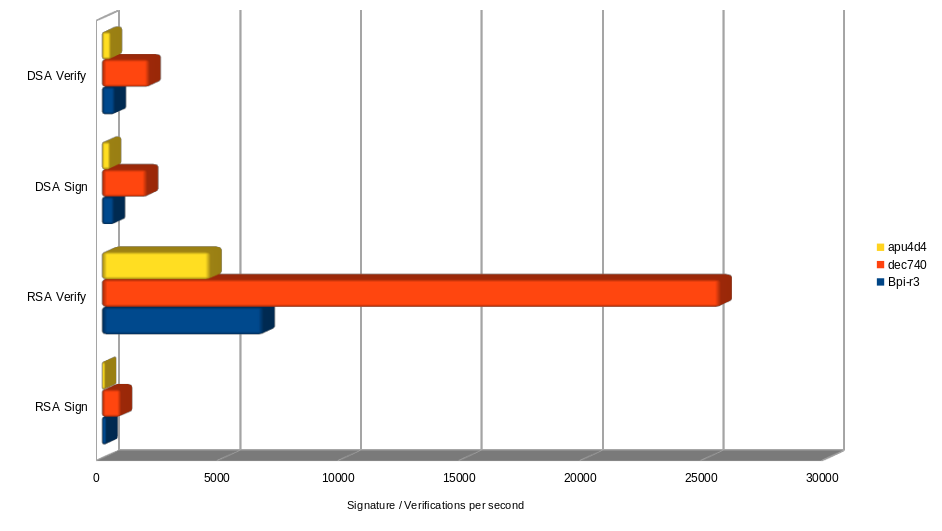
Wie erwartet schlägt die AMD-Embedded-CPU des DEC740 in allen Benchmarks. Der Banana Pi ist in jedem Test auch schneller als die AMD-CPU der APU4. Insgesamt würde ich sagen: Eine sehr ordentliche Leistung für einen solchen stromsparenden SoC.
Stromverbrauch:
| Bereich Stromverbrauch in Watt | Anzahl Twisted Pair verbunden | Anzahl SFP verbunden | Wifi 2.5GHz aktiv | Wifi 5GHz aktiv | CPU-Status | M2 SSD | mini-PCI express |
|---|---|---|---|---|---|---|---|
| 4.1 - 4.2 | 1 | 0 | |
|
idle | |
|
| 4.8 - 4.9 | 1 | 0 |  |
|
idle | |
|
| 5.1 | 1 | 0 | |
|
idle | |
|
| 5.1 - 5.2 | 1 | 0 | |
|
CPU-Benchmark OpenSSL | |
|
| 5,9 - 6 | 1 | 0 | |
|
10-20% Auslastung | |
|
| 8.1 | 1 | 0 | |
|
idle | |
|
| 8.3 - 8.4 | 1 | 0 | |
|
CPU-Benchmark OpenSSL | |
|
Als Fazit würde ich sagen: Der Unterschied zwischen Leerlauf und CPU-intensiven Aufgaben liegt bei rund 0,3 Watt. Der größte Unterschied liegt in der Verwendung einer NVME-SSD. Sie schlägt mit etwas mehr als 3 Watt zu Buche. Das Aktivieren von WLAN kostet rund 0,6 Watt extra. Unter Volllast und voll ausgestattet mit M.2 und mini PCIe kann es etwas über 10 Watt gehen, was ein wirklich beachtlicher Wert ist.
Schlusswort
Wenn Sie planen, dieses Gerät zu beschaffen, empfehle ich, es zusammen mit einem Gehäuse, WLAN-Antennenkabeln und Antennen zu kaufen. Am logischsten wäre es, ein solches Kit zu nehmen.
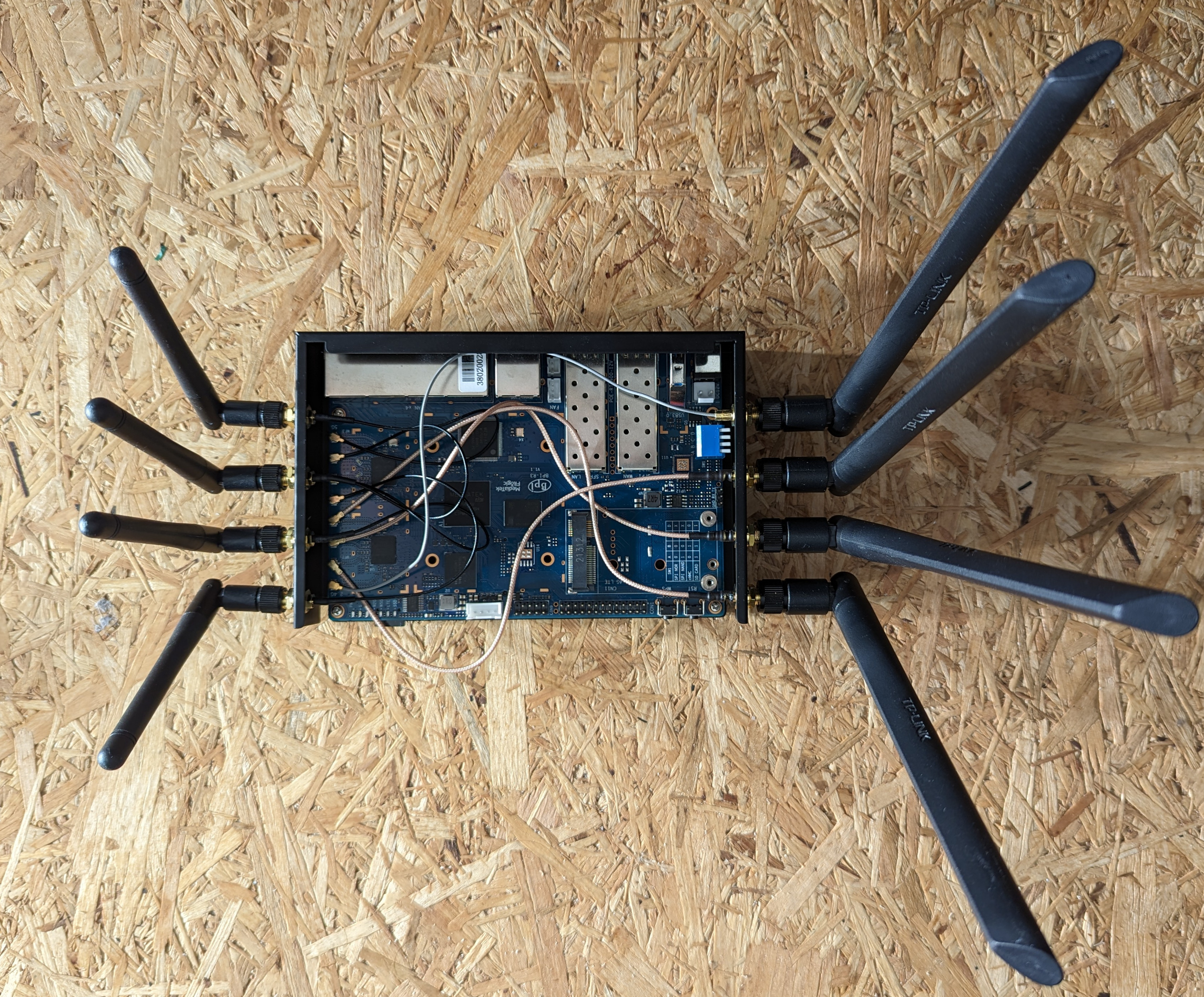
Wenn Sie von 1G auf 2.5G-Ethernet wechseln möchten, ist es auch ein ziemlich idealer Kandidat, wenn man das wirklich gute Preis-Leistungs-Verhältnis berücksichtigt. Der aktuelle instabile Zweig von OpenWrt ist bereits gut nutzbar, aber Sie können natürlich auch das Image des Herstellers verwenden, das eine einigermaßen aktuelle Version von OpenWrt ist.
Der Banana Pi R3 ist ein guter Performer und verbraucht gleichzeitig nur wenig Strom. 
Anhang
Vollständiges Bootlog:
[    0.000000] Booting Linux on physical CPU 0x0000000000 [0x410fd034]
[    0.000000] Linux version 5.15.79 (builder@buildhost) (aarch64-openwrt-linux-musl-gcc (OpenWrt GCC 11.3.0 r21314-1996d600bd) 11.3.0, GNU ld (GNU Binutils) 2.37) #0 SMP Thu Nov 17 15:43:55 2022
[    0.000000] Machine model: Bananapi BPI-R3
[    0.000000] Zone ranges:
[    0.000000]   DMA      [mem 0x0000000040000000-0x00000000bfffffff]
[    0.000000]   DMA32    empty
[    0.000000]   Normal   empty
[    0.000000] Movable zone start for each node
[    0.000000] Early memory node ranges
[    0.000000]   node   0: [mem 0x0000000040000000-0x0000000042ffffff]
[    0.000000]   node   0: [mem 0x0000000043000000-0x000000004302ffff]
[    0.000000]   node   0: [mem 0x0000000043030000-0x000000004fbfffff]
[    0.000000]   node   0: [mem 0x000000004fc00000-0x000000004fcfffff]
[    0.000000]   node   0: [mem 0x000000004fd00000-0x00000000bfffffff]
[    0.000000] Initmem setup node 0 [mem 0x0000000040000000-0x00000000bfffffff]
[    0.000000] psci: probing for conduit method from DT.
[    0.000000] psci: PSCIv1.1 detected in firmware.
[    0.000000] psci: Using standard PSCI v0.2 function IDs
[    0.000000] psci: MIGRATE_INFO_TYPE not supported.
[    0.000000] psci: SMC Calling Convention v1.2
[    0.000000] percpu: Embedded 17 pages/cpu s30040 r8192 d31400 u69632
[    0.000000] pcpu-alloc: s30040 r8192 d31400 u69632 alloc=17*4096
[    0.000000] pcpu-alloc: [0] 0 [0] 1 [0] 2 [0] 3
[    0.000000] Detected VIPT I-cache on CPU0
[    0.000000] CPU features: detected: GIC system register CPU interface
[    0.000000] CPU features: kernel page table isolation disabled by kernel configuration
[    0.000000] Built 1 zonelists, mobility grouping on.  Total pages: 516096
[    0.000000] Kernel command line: root=/dev/mmcblk0p65
[    0.000000] Dentry cache hash table entries: 262144 (order: 9, 2097152 bytes, linear)
[    0.000000] Inode-cache hash table entries: 131072 (order: 8, 1048576 bytes, linear)
[    0.000000] mem auto-init: stack:off, heap alloc:off, heap free:off
[    0.000000] Memory: 2043268K/2097152K available (8320K kernel code, 898K rwdata, 2176K rodata, 384K init, 300K bss, 53884K reserved, 0K cma-reserved)
[    0.000000] SLUB: HWalign=64, Order=0-3, MinObjects=0, CPUs=4, Nodes=1
[    0.000000] rcu: Hierarchical RCU implementation.
[    0.000000]  Tracing variant of Tasks RCU enabled.
[    0.000000] rcu: RCU calculated value of scheduler-enlistment delay is 10 jiffies.
[    0.000000] NR_IRQS: 64, nr_irqs: 64, preallocated irqs: 0
[    0.000000] GICv3: GIC: Using split EOI/Deactivate mode
[    0.000000] GICv3: 640 SPIs implemented
[    0.000000] GICv3: 0 Extended SPIs implemented
[    0.000000] GICv3: Distributor has no Range Selector support
[    0.000000] Root IRQ handler: gic_handle_irq
[    0.000000] GICv3: 16 PPIs implemented
[    0.000000] GICv3: CPU0: found redistributor 0 region 0:0x000000000c080000
[    0.000000] arch_timer: cp15 timer(s) running at 13.00MHz (phys).
[    0.000000] clocksource: arch_sys_counter: mask: 0xffffffffffffff max_cycles: 0x2ff89eacb, max_idle_ns: 440795202429 ns
[    0.000000] sched_clock: 56 bits at 13MHz, resolution 76ns, wraps every 4398046511101ns
[    0.000138] Calibrating delay loop (skipped), value calculated using timer frequency.. 26.00 BogoMIPS (lpj=130000)
[    0.000146] pid_max: default: 32768 minimum: 301
[    0.000230] Mount-cache hash table entries: 4096 (order: 3, 32768 bytes, linear)
[    0.000243] Mountpoint-cache hash table entries: 4096 (order: 3, 32768 bytes, linear)
[    0.001126] rcu: Hierarchical SRCU implementation.
[    0.001213] dyndbg: Ignore empty _ddebug table in a CONFIG_DYNAMIC_DEBUG_CORE build
[    0.001412] smp: Bringing up secondary CPUs ...
[    0.001643] Detected VIPT I-cache on CPU1
[    0.001664] GICv3: CPU1: found redistributor 1 region 0:0x000000000c0a0000
[    0.001690] CPU1: Booted secondary processor 0x0000000001 [0x410fd034]
[    0.001952] Detected VIPT I-cache on CPU2
[    0.001964] GICv3: CPU2: found redistributor 2 region 0:0x000000000c0c0000
[    0.001975] CPU2: Booted secondary processor 0x0000000002 [0x410fd034]
[    0.002196] Detected VIPT I-cache on CPU3
[    0.002206] GICv3: CPU3: found redistributor 3 region 0:0x000000000c0e0000
[    0.002216] CPU3: Booted secondary processor 0x0000000003 [0x410fd034]
[    0.002243] smp: Brought up 1 node, 4 CPUs
[    0.002257] SMP: Total of 4 processors activated.
[    0.002260] CPU features: detected: 32-bit EL0 Support
[    0.002263] CPU features: detected: CRC32 instructions
[    0.002338] CPU: All CPU(s) started at EL2
[    0.002349] alternatives: patching kernel code
[    0.004700] clocksource: jiffies: mask: 0xffffffff max_cycles: 0xffffffff, max_idle_ns: 19112604462750000 ns
[    0.004722] futex hash table entries: 1024 (order: 4, 65536 bytes, linear)
[    0.004832] pinctrl core: initialized pinctrl subsystem
[    0.005399] NET: Registered PF_NETLINK/PF_ROUTE protocol family
[    0.005614] DMA: preallocated 256 KiB GFP_KERNEL pool for atomic allocations
[    0.005646] DMA: preallocated 256 KiB GFP_KERNEL|GFP_DMA pool for atomic allocations
[    0.005672] DMA: preallocated 256 KiB GFP_KERNEL|GFP_DMA32 pool for atomic allocations
[    0.005896] thermal_sys: Registered thermal governor 'fair_share'
[    0.005899] thermal_sys: Registered thermal governor 'bang_bang'
[    0.005902] thermal_sys: Registered thermal governor 'step_wise'
[    0.005906] thermal_sys: Registered thermal governor 'user_space'
[    0.006085] ASID allocator initialised with 65536 entries
[    0.006331] pstore: Registered ramoops as persistent store backend
[    0.006335] ramoops: using 0x10000@0x42ff0000, ecc: 0
[    0.014746] cryptd: max_cpu_qlen set to 1000
[    0.016446] SCSI subsystem initialized
[    0.016528] libata version 3.00 loaded.
[    0.017276] clocksource: Switched to clocksource arch_sys_counter
[    0.017683] NET: Registered PF_INET protocol family
[    0.017798] IP idents hash table entries: 32768 (order: 6, 262144 bytes, linear)
[    0.018377] tcp_listen_portaddr_hash hash table entries: 1024 (order: 2, 16384 bytes, linear)
[    0.018396] Table-perturb hash table entries: 65536 (order: 6, 262144 bytes, linear)
[    0.018404] TCP established hash table entries: 16384 (order: 5, 131072 bytes, linear)
[    0.018470] TCP bind hash table entries: 16384 (order: 6, 262144 bytes, linear)
[    0.018642] TCP: Hash tables configured (established 16384 bind 16384)
[    0.018716] UDP hash table entries: 1024 (order: 3, 32768 bytes, linear)
[    0.018743] UDP-Lite hash table entries: 1024 (order: 3, 32768 bytes, linear)
[    0.018842] NET: Registered PF_UNIX/PF_LOCAL protocol family
[    0.018861] PCI: CLS 0 bytes, default 64
[    0.020644] workingset: timestamp_bits=46 max_order=19 bucket_order=0
[    0.022650] squashfs: version 4.0 (2009/01/31) Phillip Lougher
[    0.022663] jffs2: version 2.2 (NAND) (SUMMARY) (LZMA) (RTIME) (CMODE_PRIORITY) (c) 2001-2006 Red Hat, Inc.
[    0.044579] Block layer SCSI generic (bsg) driver version 0.4 loaded (major 251)
[    0.045621] pwm-mediatek 10048000.pwm: clock: top fail: -517
[    0.045893] mtk-pcie-gen3 11280000.pcie: host bridge /soc/pcie@11280000 ranges:
[    0.045915] mtk-pcie-gen3 11280000.pcie: Parsing ranges property...
[    0.045924] mtk-pcie-gen3 11280000.pcie:      MEM 0x0020000000..0x002fffffff -> 0x0020000000
[    0.045971] phy phy-soc:t-phy@11c00000.0: u3 auto load valid efuse: ENABLE with value: 1
[    0.045999] phy phy-soc:t-phy@11c00000.0: pcie auto load valid efuse: ENABLE with value: 1
[    0.046020] phy phy-soc:t-phy@11c00000.0: u3 lane1 efuse - intr 23, rx_imp e, tx_imp c
[    0.046074] /soc/pcie@11280000: Failed to get clk index: 0 ret: -517
[    0.046085] mtk-pcie-gen3 11280000.pcie: failed to get clocks
[    0.048271] Serial: 8250/16550 driver, 16 ports, IRQ sharing enabled
[    0.049814] printk: console [ttyS0] disabled
[    0.069960] 11002000.serial: ttyS0 at MMIO 0x11002000 (irq = 122, base_baud = 2500000) is a ST16650V2
[    0.773612] printk: console [ttyS0] enabled
[    0.798378] 11003000.serial: ttyS1 at MMIO 0x11003000 (irq = 123, base_baud = 1625000) is a ST16650V2
[    0.808196] mtk_rng 1020f000.trng: registered RNG driver
[    0.808256] hwrng: no data available
[    0.817076] cacheinfo: Unable to detect cache hierarchy for CPU 0
[    0.825039] loop: module loaded
[    0.828232] Loading iSCSI transport class v2.0-870.
[    0.834418] spi-nand spi0.0: Winbond SPI NAND was found.
[    0.839740] spi-nand spi0.0: 128 MiB, block size: 128 KiB, page size: 2048, OOB size: 64
[    0.847977] 4 fixed-partitions partitions found on MTD device spi0.0
[    0.854314] Creating 4 MTD partitions on "spi0.0":
[    0.859095] 0x000000580000-0x000008000000 : "ubi"
[    0.994880] 0x000000380000-0x000000580000 : "fip"
[    1.001962] 0x000000080000-0x000000380000 : "reserved"
[    1.010512] 0x000000000000-0x000000080000 : "bl2"
[    1.031903] mtk_soc_eth 15100000.ethernet eth0: mediatek frame engine at 0xffffffc009780000, irq 132
[    1.041678] mtk_soc_eth 15100000.ethernet eth1: mediatek frame engine at 0xffffffc009780000, irq 132
[    1.051200] i2c_dev: i2c /dev entries driver
[    1.056803] mtk-wdt 1001c000.watchdog: Watchdog enabled (timeout=31 sec, nowayout=0)
[    1.065207] NET: Registered PF_INET6 protocol family
[    1.070794] Segment Routing with IPv6
[    1.074466] In-situ OAM (IOAM) with IPv6
[    1.078429] NET: Registered PF_PACKET protocol family
[    1.083494] bridge: filtering via arp/ip/ip6tables is no longer available by default. Update your scripts to load br_netfilter if you need this.
[    1.096492] 8021q: 802.1Q VLAN Support v1.8
[    1.101515] pstore: Using crash dump compression: deflate
[    1.111960] mtk-pcie-gen3 11280000.pcie: host bridge /soc/pcie@11280000 ranges:
[    1.119311] mtk-pcie-gen3 11280000.pcie: Parsing ranges property...
[    1.125563] mtk-pcie-gen3 11280000.pcie:      MEM 0x0020000000..0x002fffffff -> 0x0020000000
[    1.134030] phy phy-soc:t-phy@11c00000.0: u3 auto load valid efuse: ENABLE with value: 1
[    1.142126] phy phy-soc:t-phy@11c00000.0: pcie auto load valid efuse: ENABLE with value: 1
[    1.150388] phy phy-soc:t-phy@11c00000.0: u3 lane1 efuse - intr 23, rx_imp e, tx_imp c
[    1.165283] mmc0: host does not support reading read-only switch, assuming write-enable
[    1.175110] mmc0: new high speed SDHC card at address 0001
[    1.181377] mmcblk0: mmc0:0001 00000 29.8 GiB
[    1.189395] Alternate GPT is invalid, using primary GPT.
[    1.195355] FIT: Selected configuration: "config-mt7986a-bananapi-bpi-r3-snand" (OpenWrt bananapi_bpi-r3 with mt7986a-bananapi-bpi-r3-snand)
[    1.207945] FIT:           kernel sub-image 0x00001000..0x00519475 "kernel-1" (ARM64 OpenWrt Linux-5.15.79)
[    1.217759] FIT:          flat_dt sub-image 0x0051a000..0x00521fff "fdt-1" (ARM64 OpenWrt bananapi_bpi-r3 device tree blob)
[    1.228960] FIT:          flat_dt sub-image 0x00522000..0x00529fff "fdt-mt7986a-bananapi-bpi-r3-nor" (ARM64 OpenWrt bananapi_bpi-r3 device tree overlay mt7986a-bananapi-bpi-r3-nor)
[    1.245102] FIT:          flat_dt sub-image 0x0052a000..0x00531fff "fdt-mt7986a-bananapi-bpi-r3-emmc-nor" (ARM64 OpenWrt bananapi_bpi-r3 device tree overlay mt7986a-bananapi-bpi-r3-emmc-nor)
[    1.262113] FIT:          flat_dt sub-image 0x00532000..0x00539fff "fdt-mt7986a-bananapi-bpi-r3-emmc-snand" (ARM64 OpenWrt bananapi_bpi-r3 device tree overlay mt7986a-bananapi-bpi-r3-emmc-snand)
[    1.279475] FIT:          flat_dt sub-image 0x0053a000..0x00541fff "fdt-mt7986a-bananapi-bpi-r3-snand" (ARM64 OpenWrt bananapi_bpi-r3 device tree overlay mt7986a-bananapi-bpi-r3-snand)
[    1.295958] FIT:       filesystem sub-image 0x00542000..0x00a89fff "rootfs-1" (ARM64 OpenWrt bananapi_bpi-r3 rootfs)
[    1.306546] FIT: selecting configured loadable "rootfs-1" to be root filesystem
[    1.313842]  mmcblk0: p1 p2 p3 p4 p5 p6 p7 p65(rootfs-1) p66(rootfs_data)
[    1.379480] mtk-pcie-gen3 11280000.pcie: PCIe link down, ltssm reg val: 0x1000001
[    1.386980] mtk-pcie-gen3: probe of 11280000.pcie failed with error -110
[    1.416093] mt7530 mdio-bus:1f: configuring for fixed/2500base-x link mode
[    1.423249] mt7530 mdio-bus:1f: Link is Up - 2.5Gbps/Full - flow control rx/tx
[    1.432190] mt7530 mdio-bus:1f wan (uninitialized): PHY [mt7530-0:00] driver [MediaTek MT7531 PHY] (irq=140)
[    1.451945] mt7530 mdio-bus:1f lan1 (uninitialized): PHY [mt7530-0:01] driver [MediaTek MT7531 PHY] (irq=141)
[    1.471507] mt7530 mdio-bus:1f lan2 (uninitialized): PHY [mt7530-0:02] driver [MediaTek MT7531 PHY] (irq=142)
[    1.491055] mt7530 mdio-bus:1f lan3 (uninitialized): PHY [mt7530-0:03] driver [MediaTek MT7531 PHY] (irq=143)
[    1.510600] mt7530 mdio-bus:1f lan4 (uninitialized): PHY [mt7530-0:04] driver [MediaTek MT7531 PHY] (irq=144)
[    1.521216] DSA: tree 0 setup
[    1.526356] UBI: auto-attach mtd0
[    1.529766] ubi0: default fastmap pool size: 45
[    1.534280] ubi0: default fastmap WL pool size: 22
[    1.539057] ubi0: attaching mtd0
[    5.120136] ubi0: scanning is finished
[    5.164970] ubi0: attached mtd0 (name "ubi", size 122 MiB)
[    5.170462] ubi0: PEB size: 131072 bytes (128 KiB), LEB size: 126976 bytes
[    5.177319] ubi0: min./max. I/O unit sizes: 2048/2048, sub-page size 2048
[    5.184084] ubi0: VID header offset: 2048 (aligned 2048), data offset: 4096
[    5.191028] ubi0: good PEBs: 980, bad PEBs: 0, corrupted PEBs: 0
[    5.197013] ubi0: user volume: 3, internal volumes: 1, max. volumes count: 128
[    5.204214] ubi0: max/mean erase counter: 2/0, WL threshold: 4096, image sequence number: 1642748947
[    5.213324] ubi0: available PEBs: 465, total reserved PEBs: 515, PEBs reserved for bad PEB handling: 20
[    5.222698] ubi0: background thread "ubi_bgt0d" started, PID 516
[    5.228751] block ubiblock0_1: created from ubi0:1(rootfs)
[    5.243580] VFS: Mounted root (squashfs filesystem) readonly on device 259:0.
[    5.250864] Freeing unused kernel memory: 384K
[    5.297371] Run /sbin/init as init process
[    5.301451]   with arguments:
[    5.304402]     /sbin/init
[    5.307092]   with environment:
[    5.310221]     HOME=/
[    5.312566]     TERM=linux
[    5.437782] init: Console is alive
[    5.441274] init: - watchdog -
[    5.747136] kmodloader: loading kernel modules from /etc/modules-boot.d/*
[    5.786367] usbcore: registered new interface driver usbfs
[    5.791895] usbcore: registered new interface driver hub
[    5.797221] usbcore: registered new device driver usb
[    5.805920] phy phy-soc:t-phy@11e10000.1: u2 auto load valid efuse: ENABLE with value: 1
[    5.814081] phy phy-soc:t-phy@11e10000.2: u3 auto load valid efuse: ENABLE with value: 1
[    5.822219] phy phy-soc:t-phy@11e10000.3: u2 auto load valid efuse: ENABLE with value: 1
[    5.830754] xhci-mtk 11200000.usb: xHCI Host Controller
[    5.835975] xhci-mtk 11200000.usb: new USB bus registered, assigned bus number 1
[    5.846441] xhci-mtk 11200000.usb: hcc params 0x01403f99 hci version 0x110 quirks 0x0000000000210010
[    5.855620] xhci-mtk 11200000.usb: irq 126, io mem 0x11200000
[    5.861440] xhci-mtk 11200000.usb: xHCI Host Controller
[    5.866650] xhci-mtk 11200000.usb: new USB bus registered, assigned bus number 2
[    5.874030] xhci-mtk 11200000.usb: Host supports USB 3.2 Enhanced SuperSpeed
[    5.881382] hub 1-0:1.0: USB hub found
[    5.885134] hub 1-0:1.0: 2 ports detected
[    5.889416] usb usb2: We don't know the algorithms for LPM for this host, disabling LPM.
[    5.897731] hub 2-0:1.0: USB hub found
[    5.901481] hub 2-0:1.0: 1 port detected
[    5.907906] kmodloader: done loading kernel modules from /etc/modules-boot.d/*
[    5.924016] init: - preinit -
[    6.092133] mtk_soc_eth 15100000.ethernet eth0: configuring for fixed/2500base-x link mode
[    6.100580] mtk_soc_eth 15100000.ethernet eth0: Link is Up - 2.5Gbps/Full - flow control rx/tx
[    6.108859] mt7530 mdio-bus:1f lan1: configuring for phy/gmii link mode
[    6.121029] random: procd: uninitialized urandom read (4 bytes read)
[    6.347277] usb 1-1: new high-speed USB device number 2 using xhci-mtk
[    6.527895] hub 1-1:1.0: USB hub found
[    6.531710] hub 1-1:1.0: 4 ports detected
[    8.633135] F2FS-fs (mmcblk0p66): Disable nat_bits due to incorrect cp_ver (4249969658229546126, 18446744073709551615)
[    8.648631] F2FS-fs (mmcblk0p66): Mounted with checkpoint version = 8f5dc8e
[    8.657542] mount_root: switching to f2fs overlay
[    8.664295] overlayfs: null uuid detected in lower fs '/', falling back to xino=off,index=off,nfs_export=off.
[    8.675822] urandom-seed: Seed file not found (/etc/urandom.seed)
[    8.724964] procd: - early -
[    8.727918] procd: - watchdog -
[    9.261505] procd: - watchdog -
[    9.293802] procd: - ubus -
[    9.324372] random: ubusd: uninitialized urandom read (4 bytes read)
[    9.348190] random: ubusd: uninitialized urandom read (4 bytes read)
[    9.354644] random: ubusd: uninitialized urandom read (4 bytes read)
[    9.362726] procd: - init -
[    9.533349] urngd: v1.0.2 started.
[    9.551676] random: crng init done
[    9.552238] kmodloader: loading kernel modules from /etc/modules.d/*
[    9.555081] random: 22 urandom warning(s) missed due to ratelimiting
[    9.595240] i2c-gpio i2c-gpio-0: using lines 427 (SDA) and 428 (SCL)
[    9.601890] i2c-gpio i2c-gpio-1: using lines 429 (SDA) and 430 (SCL)
[    9.611542] crypto-safexcel 10320000.crypto: EIP97:230(0,1,4,4)-HIA:270(0,5,5),PE:150/433(alg:7fcdfc00)/0/0/0
[    9.625439] Loading modules backported from Linux version v5.15.74-0-ga3f2f5ac9d61
[    9.633017] Backport generated by backports.git v5.15.74-1-0-ge2d78967
[    9.643275] sfp sfp1: Host maximum power 1.0W
[    9.648443] sfp sfp2: Host maximum power 1.0W
[   10.099772] mt7986-wmac 18000000.wmac: HW/SW Version: 0x8a108a10, Build Time: 20220113162701a
[   10.099772]
[   10.221377] mt7986-wmac 18000000.wmac: WM Firmware Version: ____000000, Build Time: 20220113162756
[   10.297869] mt7986-wmac 18000000.wmac: WA Firmware Version: DEV_000000, Build Time: 20220113163034
[   13.650763] PPP generic driver version 2.4.2
[   13.655663] NET: Registered PF_PPPOX protocol family
[   13.663095] kmodloader: done loading kernel modules from /etc/modules.d/*
[   15.339624] mtk_soc_eth 15100000.ethernet eth0: Link is Down
[   15.350975] mtk_soc_eth 15100000.ethernet eth0: configuring for fixed/2500base-x link mode
[   15.359415] mtk_soc_eth 15100000.ethernet eth0: Link is Up - 2.5Gbps/Full - flow control rx/tx
[   15.360471] mt7530 mdio-bus:1f lan1: configuring for phy/gmii link mode
[   15.375297] IPv6: ADDRCONF(NETDEV_CHANGE): eth0: link becomes ready
[   15.381765] br-lan: port 1(lan1) entered blocking state
[   15.386978] br-lan: port 1(lan1) entered disabled state
[   15.393800] device lan1 entered promiscuous mode
[   15.398410] device eth0 entered promiscuous mode
[   15.410676] mt7530 mdio-bus:1f lan2: configuring for phy/gmii link mode
[   15.420146] br-lan: port 2(lan2) entered blocking state
[   15.425382] br-lan: port 2(lan2) entered disabled state
[   15.432298] device lan2 entered promiscuous mode
[   15.441402] mt7530 mdio-bus:1f lan3: configuring for phy/gmii link mode
[   15.450824] br-lan: port 3(lan3) entered blocking state
[   15.456049] br-lan: port 3(lan3) entered disabled state
[   15.463104] device lan3 entered promiscuous mode
[   15.472047] mt7530 mdio-bus:1f lan4: configuring for phy/gmii link mode
[   15.481479] br-lan: port 4(lan4) entered blocking state
[   15.486717] br-lan: port 4(lan4) entered disabled state
[   15.494051] device lan4 entered promiscuous mode
[   15.502945] mt7530 mdio-bus:1f sfp2: configuring for inband/2500base-x link mode
[   15.511707] br-lan: port 5(sfp2) entered blocking state
[   15.516924] br-lan: port 5(sfp2) entered disabled state
[   15.524292] device sfp2 entered promiscuous mode
[   15.533019] mtk_soc_eth 15100000.ethernet eth1: configuring for inband/2500base-x link mode
[   15.543221] br-wan: port 1(eth1) entered blocking state
[   15.548488] br-wan: port 1(eth1) entered disabled state
[   15.553898] device eth1 entered promiscuous mode
[   15.560020] br-wan: port 1(eth1) entered blocking state
[   15.565253] br-wan: port 1(eth1) entered forwarding state
[   15.572464] mt7530 mdio-bus:1f wan: configuring for phy/gmii link mode
[   15.581773] br-wan: port 2(wan) entered blocking state
[   15.586903] br-wan: port 2(wan) entered disabled state
[   15.593470] device wan entered promiscuous mode
[   16.408168] br-wan: port 1(eth1) entered disabled state
[  193.814602] mt7530 mdio-bus:1f lan1: Link is Up - 1Gbps/Full - flow control rx/tx
[  193.822115] br-lan: port 1(lan1) entered blocking state
[  193.827333] br-lan: port 1(lan1) entered forwarding state
[  193.833162] IPv6: ADDRCONF(NETDEV_CHANGE): br-lan: link becomes ready
[  287.891369] br-lan: port 1(lan1) entered disabled state
[  287.896880] mt7530 mdio-bus:1f lan1: Link is Down
[  293.081579] mt7530 mdio-bus:1f lan1: Link is Up - 1Gbps/Full - flow control rx/tx
[  293.089077] br-lan: port 1(lan1) entered blocking state
[  293.094287] br-lan: port 1(lan1) entered forwarding state
[  301.101303] br-lan: port 1(lan1) entered disabled state
[  301.106755] mt7530 mdio-bus:1f lan1: Link is Down
[  304.282153] mt7530 mdio-bus:1f lan4: Link is Up - 1Gbps/Full - flow control rx/tx
[  304.289655] br-lan: port 4(lan4) entered blocking state
[  304.294864] br-lan: port 4(lan4) entered forwarding state
[  307.904696] br-lan: port 4(lan4) entered disabled state
[  307.907334] mt7530 mdio-bus:1f lan4: Link is Down
[  310.835081] mt7530 mdio-bus:1f wan: Link is Up - 1Gbps/Full - flow control rx/tx
[  310.842499] br-wan: port 2(wan) entered blocking state
[  310.847630] br-wan: port 2(wan) entered forwarding state
[  386.456840] br-wan: port 2(wan) entered disabled state
[  386.462097] mt7530 mdio-bus:1f wan: Link is Down
[  389.659638] mt7530 mdio-bus:1f wan: Link is Up - 1Gbps/Full - flow control rx/tx
[  389.667059] br-wan: port 2(wan) entered blocking state
[  389.672192] br-wan: port 2(wan) entered forwarding state
[  390.411235] mt7530 mdio-bus:1f wan: Link is Down
[  390.415902] br-wan: port 2(wan) entered disabled state
[  450.869708] mt7530 mdio-bus:1f wan: Link is Up - 1Gbps/Full - flow control rx/tx
[  450.877127] br-wan: port 2(wan) entered blocking state
[  450.882265] br-wan: port 2(wan) entered forwarding state
[  475.624227] mt7530 mdio-bus:1f wan: Link is Down
[  475.628906] br-wan: port 2(wan) entered disabled state
[  478.524009] mt7530 mdio-bus:1f lan1: Link is Up - 1Gbps/Full - flow control rx/tx
[  478.531561] br-lan: port 1(lan1) entered blocking state
[  478.536788] br-lan: port 1(lan1) entered forwarding state